01
Overview: cited web answers with no server
Brello 1.0, the app for Android and iPhone made by Stuvio, runs its language models entirely on the phone. When a question needs fresh facts, it searches the open web from the phone as well, with no Brello server in between.
This paper describes that pipeline as it ships in version 1.0.0, stage by stage, with the parameters the app uses. The phone rewrites the question as a search query and tries up to eight search providers in turn until one returns relevant results. It reads up to four of the result pages, ranks short passages from them, and gives the best to the on-device model, which cites them inline as [1], [2] and so on.
We call this private AI web search, and the phrase needs a precise scope. The question, the text of the pages and the answer are processed on the phone. The search text and the page requests do leave it: they go directly to a search engine and to the sites in the results, which see a normal web request, including the phone’s IP address. Section 9 lists each privacy property and its mechanism. We describe the design and its parameters here; we have not published measurements of answer quality.
02
The constraint: a small model, a phone and no broker
Three constraints shape every stage of the pipeline: the model is small, all the work runs on a phone, and there is no server to broker the search.
The model is small. Brello Pro and Brello Vision are based on Gemma 4 E4B and E2B by Google, and Brello Core on Qwen3 1.7B by Alibaba. All three are released under Apache 2.0 and run locally with Google’s LiteRT-LM runtime.1 Brello is not affiliated with or endorsed by Google or Alibaba. Each model has a context window of 4,096 tokens, shared by the instructions, the conversation so far, any web results, the question and the answer. Like any language model, it also has a knowledge cutoff, so fresh facts have to come from somewhere else.
The work runs on a phone. Parsing and ranking pages compete with the interface for the same processor, so each step has to be cheap, and the heavy ones have to stay off the thread that draws the screen.
There is no broker. Retrieval-augmented generation, giving a language model retrieved text alongside the question, is an established technique.2 Brello 1.0 has no backend, so the phone uses the web’s ordinary interfaces instead, the same results pages and article pages a browser requests, and does the reading and ranking itself. Two older ideas from information retrieval make that practical. Boilerplate removal separates an article from the page around it,3 and BM25, a ranking function developed for the Okapi system at TREC-3 in 1994, scores how well a passage matches a query from word counts alone, without a neural network.4
03
The pipeline at a glance
Six stages run between a question and a cited answer. Two of them contact other computers, and in both the phone makes the request directly: the search text goes to a search engine, and ordinary page requests go to the sites in the results. Figure 1 follows one question through all six.
- You ask a question. Web search is switched on, so Brello can use fresh sources. Everything inside the dashed line runs on the phone.
- The phone writes a search query. Instructions meant for the answer, such as “Keep it short”, are removed before anything is sent.
- The search text leaves the phone. It goes straight to a search engine, with no Brello server in between. The top six results become sources [1] to [6].
- Up to four pages are requested and read in parallel. The requests go directly to the sites, and reader mode keeps the article text, split into passages of about 420 to 700 characters.
- Every passage is scored with BM25. At most two passages per source are kept, so one long page can’t crowd out the others.
- The on-device model writes the answer. The kept passages, up to 3,400 characters for Brello Pro and Brello Vision, go into its prompt, and the answer cites them by number.
Parsing pages and ranking passages are the heaviest stages, so both run on background isolates: threads with their own memory in Dart, the language Brello is written in.5 Running them off the interface thread is meant to keep the interface at the display’s 60 or 120 frames per second; we have not published frame-rate measurements. The reply’s status line moves through “Searching the web”, “Reading 4 sources” and “Thinking”, and the finished reply records its time and route, for example “3.1s · Web + on-device”.
04
Deciding whether to search
Brello 1.0 searches only after the person turns web search on in Settings or the + menu, or chooses “Search the web” on the card described below, which runs that search and turns web search on for later questions. Even then, it skips questions that don’t need the web. Web search is off by default.
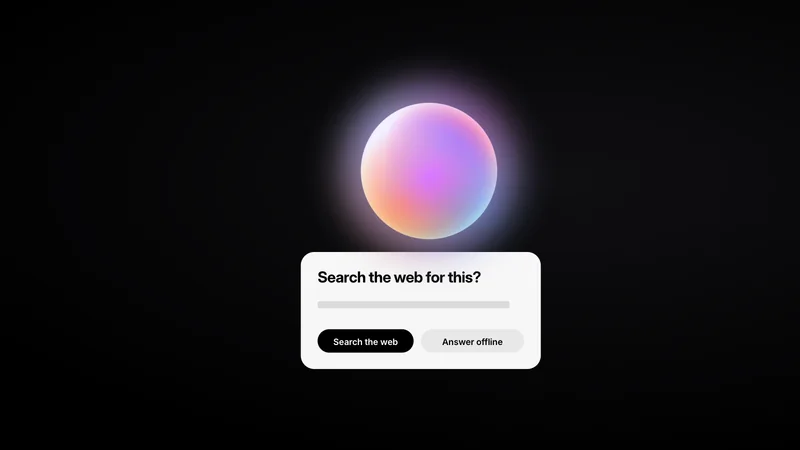
With search on, Brello skips it for messages under four characters, pure arithmetic, short small talk such as “hi” or “thanks”, and writing tasks such as “translate” or “brainstorm”, unless they mention something fresh. With search off, a question that looks time-sensitive, for example one about news, prices, weather, scores, schedules or exchange rates, or one that says “latest” or “this week”, pauses the reply at “Needs the web”. A card titled “Search the web for this?” appears, with two buttons, “Search the web” and “Answer offline”, and choosing search turns web search on. A message with a photo never triggers a search. Asking before going online describes these rules and the card in detail.
When a search goes ahead, the question is rewritten as search text (Table 1). Instructions about the answer’s form are removed, contractions are expanded, and “What’s new in X” becomes “latest X news”. A time-relative question without a year gains the current month and year, except for live data such as weather, scores, prices, stocks, rates and traffic. A follow-up of four words or fewer, or one that refers back with “he”, “it” or “that”, gets the first ten words of the previous question in front of it.
| Question | Search text | Rule applied |
|---|---|---|
| “Why is the sky blue? Keep it short.” | Why is the sky blue | Instructions about the answer are removed |
| “What’s new in AI this week?” | latest AI news October 2026 | “What’s new in X” becomes “latest X news”, and the month and year are added |
| “latest iPhone release” | latest iPhone release October 2026 | A time-relative question without a year gains the month and year |
05
Finding results without a broker: the provider chain
Brello 1.0 has no search API of its own. The phone tries up to eight providers in a fixed order and stops at the first that returns relevant results.
The first two providers load a full results page in an invisible browser on the phone: Android’s system WebView,6 used as a single hidden tab for one search at a time. A browser engine receives the same results a person would, where a bare HTTP request might be refused. The browser warms up on a blank page, with no network request, three seconds after a chat opens and when the person starts typing, but only while web search is on. After three idle minutes it is destroyed, and its cookies, cache and storage are wiped. The other six providers are direct HTTP requests. Figure 2 follows a hypothetical search through the chain.
- Eight providers, always tried in the same order. The first two load a results page in an invisible browser on the phone and get 14 seconds each; the other six are direct HTTP requests with 7 seconds each.
- A provider that fails is rested for 2 minutes. Suppose the first provider doesn’t answer within its 14 seconds: the phone stops waiting, moves on, and skips it for the next 2 minutes.
- The relevance guard rejects irrelevant results. Suppose the next set is dictionary pages for “why”. Fewer than a third of the top hits mention “sky” and “blue”, so the chain moves on.
- The first relevant set ends the search. When all six hits match, providers 4 to 8 are never contacted, and the hits become sources [1] to [6].
- Rested providers are skipped; Wikipedia never is. A search 40 seconds later goes straight to the second provider, and the chain always ends with one it can still ask.
Show data
| # | Provider | Method | Timeout |
|---|---|---|---|
| 1 | DuckDuckGo (full results page) | Invisible browser on the phone (system WebView) | 14 s |
| 2 | Bing | Invisible browser on the phone | 14 s |
| 3 | DuckDuckGo Lite | Direct HTTP | 7 s |
| 4 | DuckDuckGo HTML | Direct HTTP | 7 s |
| 5 | Google News RSS (last 7 days; time-sensitive questions only) | Direct HTTP | 7 s |
| 6 | Brave Search | Direct HTTP | 7 s |
| 7 | Bing | Direct HTTP | 7 s |
| 8 | Wikipedia (search API; never rested) | Direct HTTP | 7 s |
Four rules keep the chain fast and predictable:
- A provider that fails is rested. A provider that fails or is blocked is skipped for 2 minutes, so later questions don’t wait on it. Wikipedia is never rested, so the chain always ends with a provider it can ask.
- Irrelevant results are rejected. Results are de-duplicated, and at least a third of the top hits must mention the question’s key terms. This rejects, for example, dictionary pages for “why” when the question was “why is the sky blue”.
- Human checks end the attempt. When a provider responds with a check such as “unusual traffic” or “are you a robot”, Brello moves on to the next provider rather than trying to get past it.
- News feeds are used only for news. Google News RSS, limited to the last seven days, is tried only for time-sensitive questions.
Results are cached in memory for 15 minutes per query, so a repeated search isn’t sent again. The cache is never written to storage and is gone when the app closes.
06
Reading pages: reader-mode extraction
Brello reads each result page the way a browser’s reader view does: it keeps the article text and discards everything around it. Figure 3 follows one page from the fetch to the passages that reach the model.
The top six results become the sources numbered [1] to [6]. The phone fetches up to four of those pages in parallel, each with a 7-second timeout. It accepts only HTML or plain text and stops reading a page at 1.5 MB, so one heavy page can’t stall the phone. Google News results are redirects, so for those Brello uses the headline and date rather than following the link.
Reader-mode extraction then strips navigation, headers and footers, adverts, cookie banners, share widgets, comments, reference lists and Wikipedia edit links. It keeps the main article text, removes duplicated blocks and stops at about 24,000 characters per page. Finally, the text is split into passages of about 420 to 700 characters. At those lengths, between four and eight passages fit in the 3,400-character budget described in Section 8.
- The phone fetches up to four result pages in parallel. Each must arrive within 7 seconds, and only HTML or plain text up to 1.5 MB is read, so one heavy page can’t stall the phone.
- Reader mode removes everything that isn’t the article. Cookie banners, navigation, adverts, share buttons, references, comments and footers go; up to 24,000 characters of article text stay.
- The article is split into passages of about 420 to 700 characters. Brello ranks passages, not whole pages, and only passages ever reach the model.
- At most two passages from each page are kept. Every passage is scored against the search text with BM25, and the cap means one long page can’t crowd out the others.
- Kept passages from every page share one budget. For Brello Pro and Brello Vision, built on Gemma 4, the numbered passages must fit in 3,400 characters.
- Brello Core, built on Qwen3, has 2,600 characters. Fewer passages fit, so in this example the second passage from this page and the passage from source [4] are left out.
07
Ranking passages with BM25
Every passage is scored against the search text with BM25, using k₁ = 1.2 and b = 0.75, values within the range that standard textbooks report as reasonable.7 BM25 rewards passages that contain the query’s words, especially rare ones, without letting any one word dominate.
For a passage D and a query Q, BM25 adds up a contribution from each query term q (Equation 1).8 The contribution grows with the number of times the term appears in the passage, f(q, D), with diminishing returns. It is weighted by the term’s inverse document frequency, IDF(q), so rare words count for more than common ones.9
Two parameters shape the fraction on the right. k1 sets how quickly repeated mentions stop adding to the score: however many times a term appears, it can’t contribute more than k1 + 1 times its IDF. b sets how strongly the passage’s length counts, from 0 (ignored) to 1 (fully normalised). Figure 4 computes the fraction for the values Brello uses.
- One mention scores exactly one IDF. In a passage of average length, the first appearance of a query term adds 1.00 times the term’s IDF, which is larger for rarer words.
- Each further mention adds less than the last. The second adds 0.38, the third 0.20 and the tenth only 0.02, so repeating a word buys little.
- No number of mentions can pass 2.2. The ceiling is k₁ + 1. Ten mentions reach 1.96, 89% of it.
- The same count is worth more in a shorter passage. With b = 0.75, one mention scores 1.11 in a passage a quarter shorter than average and 0.91 in one a quarter longer.
Show data
| Mentions, f(q, D) | Short (0.75 × average) | Average length | Long (1.25 × average) | Added by this mention (average) |
|---|---|---|---|---|
| 0 | 0.00 | 0.00 | 0.00 | – |
| 1 | 1.11 | 1.00 | 0.91 | +1.00 |
| 2 | 1.48 | 1.38 | 1.28 | +0.38 |
| 3 | 1.66 | 1.57 | 1.49 | +0.20 |
| 4 | 1.77 | 1.69 | 1.62 | +0.12 |
| 5 | 1.84 | 1.77 | 1.71 | +0.08 |
| 6 | 1.89 | 1.83 | 1.78 | +0.06 |
| 7 | 1.93 | 1.88 | 1.83 | +0.04 |
| 8 | 1.96 | 1.91 | 1.87 | +0.03 |
| 9 | 1.98 | 1.94 | 1.90 | +0.03 |
| 10 | 2.00 | 1.96 | 1.93 | +0.02 |
| Limit as f grows | 2.20 | 2.20 | 2.20 | 0 |
Values are the term-frequency factor f·(k₁ + 1) / (f + k₁·(1 − b + b·|D|/avgdl)) with k₁ = 1.2 and b = 0.75, in units of the term’s IDF.
Saturation matters most for questions with several key terms. Take two passages of average length, and assume “sky” and “blue” have the same IDF. A passage that mentions “sky” ten times scores 1.96 IDF for that term. A passage that mentions each word once scores 1.00 + 1.00 = 2.00. Before any adjustment, BM25 already prefers the passage that covers more of the question.
Brello adds two adjustments to the BM25 score: a bonus for passages that cover more of the question’s distinct terms, and a small bonus for lead paragraphs. BM25 itself matches words, not meanings, so a passage that answers the question in different words scores only on the words it shares with the query.
08
Writing a cited answer within the context budget
Brello keeps at most two passages from each source, within a budget of 3,400 characters for Brello Pro and Brello Vision, which are built on Gemma 4, and 2,600 characters for Brello Core, built on Qwen3. The on-device model then writes the answer from those passages and cites them by number.
The per-source cap means one long page can’t crowd out the others, and the budget is the tighter limit: four pages at two passages of up to 700 characters could supply 5,600 characters, more than either budget allows. A source with no good passage falls back to its search snippet, with 900 characters shared among all such snippets. The kept passages reach the model as a compact, numbered block labelled Web results (retrieved …), each tagged with its source number.
The budget is small because everything shares one context window (Table 2). Every reply also opens a fresh model session, so web results from an earlier question never take up room in the next.
| Part of the prompt | Limit in Brello 1.0 |
|---|---|
| Instructions | A short system prompt. When web results are present, it gains the current date and one instruction about citing. |
| Conversation so far | Up to six earlier messages, with questions clipped to 300 characters and replies to 600 |
| Web results | Up to 3,400 characters (Brello Pro, Brello Vision) or 2,600 (Brello Core) |
| The answer | Up to 1,200 tokens, or 2,048 with Think harder |
The citation instruction is the only change web results make to the system prompt, apart from the date. It reads, verbatim:
// Added to the system prompt when web results are present
Base your answer on them and cite the sources you rely on inline using their numbers, like [1] or [2]. If the results do not answer the question, say so briefly and answer from general knowledge.
The system prompt is otherwise short on purpose, because small models tend to copy the shape of long instructions. Small models copy the shape of their instructions explains why. As the answer streams in, citation markers become tappable links, and source cards above the answer show each site’s letter mark, domain, citation number and page title (Figure 5). Tapping a card opens the page in the phone’s browser.
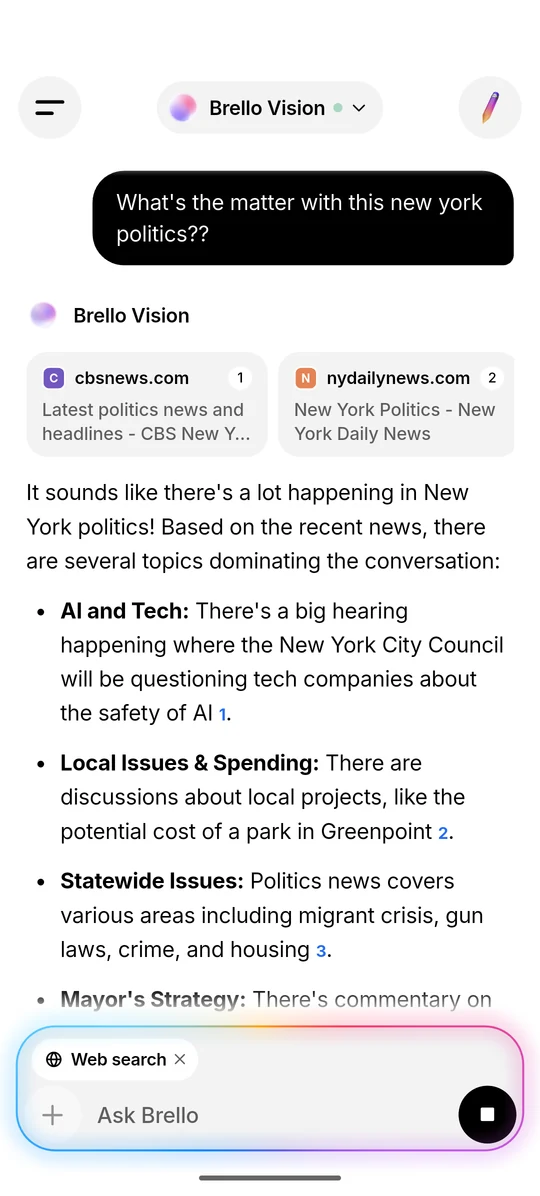
The letter marks are a privacy decision. Fetching each site’s icon would mean another request to every site in the results, whether or not the person opens it. Brello draws a monogram on the phone instead, in a colour derived from the domain name, so no icon requests leave the phone.
09
Privacy properties
The pipeline sends two kinds of request, the search text to a search engine and page requests to up to four sites, and nothing to Stuvio. Table 3 lists each property and the mechanism that provides it.
| Property | How it holds |
|---|---|
| Off by default | Web search runs only after the person turns it on in Settings or the + menu, or chooses “Search the web” on the card, which runs that search and turns web search on for later questions. |
| No Brello server | Search and page requests go directly from the phone. There is no Brello proxy or relay, so Brello has no logs to keep. |
| Only the search text and page requests leave | The refined query goes to the search engine, and up to four result pages are requested from their sites. On a short follow-up, up to ten words of the previous question may be added to the query. Reading, ranking and answering stay on the phone. |
| Privacy signals on every request | Search and page requests send DNT: 1 and Sec-GPC: 1, the Do Not Track and Global Privacy Control headers.1011 |
| Search browser wiped after 3 idle minutes | The invisible browser is destroyed after three idle minutes, and its cookies, cache and local storage are wiped. |
| Memory-only cache | Results are held in memory for 15 minutes and are gone when the app closes. |
| No icon requests | Source cards use letter marks drawn on the phone instead of site icons. |
| Photos never search | A question with a photo is always answered on the phone. |
These properties have limits. The search engine and the sites in the results still receive each request, including the phone’s IP address, as they would for any ordinary web request. The two headers state a preference; they don’t stop a site from receiving the request. Brello doesn’t hide the request, and it doesn’t add anything of its own. Privacy at Brello covers the rest of the app, and the privacy policy is the formal statement.
10
Limitations
The pipeline trades breadth for privacy and speed, and it fails in ways we can name.
- It depends on third-party search engines. A search can take up to 14 seconds for each browser-based attempt, or come back empty. When it does, Brello answers from the model’s own knowledge.
- The evidence is small. A few thousand characters stand in for whole documents, so anything outside the kept passages is invisible to the model.
- Ranking is lexical. BM25 matches words, not meanings. A passage that answers in different words can rank below one that merely repeats the query.
- The relevance guard is a heuristic. Requiring a third of the top hits to mention the key terms filters obvious mismatches. It says nothing about whether a page is accurate.
- Small models make mistakes. The model can misread a passage, cite the wrong source or state something no source supports. The prompt tells it to say when the results don’t answer the question, which is an instruction, not a guarantee. We have not published measurements of how often this happens.
- Pages are untrusted input. A page can contain text written to steer a model, known as indirect prompt injection.12 Brello 1.0 labels retrieved text as web results and tells the model to base its answer on them, but a small model may still follow instructions it reads.
- News results are thin. Google News links are redirects, so only a headline and a date reach the model.
11
What comes next
Brello Super Intelligence is in development. This section describes intent, not results.
Brello Super Intelligence (Brello SI) is being designed to keep the open web as a layer it uses only on request, as Brello 1.0 does, and to run heavier work on sealed compute that the device verifies before sending anything. Private compute you can verify: the design space sets out that design.
Questions this paper leaves open carry over to Brello SI: how large an evidence budget a model can use well; how ranking can match meaning as well as words, as dense retrieval models do,13 within a phone’s memory; and how a reader can check that a cited passage supports the sentence that cites it. We don’t yet know the answers. The Brello Charter commits us to evaluate new capability before it ships, and to publish what we evaluate and what we find.
12
References
- Google AI Edge. “LiteRT-LM.” GitHub repository. github.com/
google-ai-edge/ (accessed 5 October 2026).LiteRT-LM - P. Lewis et al. “Retrieval-Augmented Generation for Knowledge-Intensive NLP Tasks.” Advances in Neural Information Processing Systems 33 (NeurIPS 2020). arXiv:2005.11401
- C. Kohlschütter, P. Fankhauser and W. Nejdl. “Boilerplate Detection Using Shallow Text Features.” Proceedings of the Third ACM International Conference on Web Search and Data Mining (WSDM ’10), pp. 441–450, 2010. doi:10.1145/1718487.1718542
- S. E. Robertson, S. Walker, S. Jones, M. M. Hancock-Beaulieu and M. Gatford. “Okapi at TREC-3.” Proceedings of the Third Text REtrieval Conference (TREC-3), NIST Special Publication 500-226, 1994. trec.nist.gov/
pubs/ trec3 - Dart. “Concurrency in Dart.” Dart documentation. dart.dev/
language/ (accessed 5 October 2026).concurrency - Android Developers. “WebView.” Android API reference. developer.android.com/
reference/ (accessed 5 October 2026).android/ webkit/ WebView - C. D. Manning, P. Raghavan and H. Schütze. Introduction to Information Retrieval, section 11.4.3, “Okapi BM25: a non-binary model.” Cambridge University Press, 2008. nlp.stanford.edu/
IR-book - S. Robertson and H. Zaragoza. “The Probabilistic Relevance Framework: BM25 and Beyond.” Foundations and Trends in Information Retrieval, 2009. doi:10.1561/1500000019
- K. Spärck Jones. “A Statistical Interpretation of Term Specificity and Its Application in Retrieval.” Journal of Documentation 28(1):11–21, 1972. doi:10.1108/eb026526
- W3C. “Tracking Preference Expression (DNT).” W3C Working Group Note, 17 January 2019. w3.org/
TR/ tracking-dnt - W3C. “Global Privacy Control (GPC).” W3C Working Draft, 24 September 2026. w3.org/
TR/ (accessed 5 October 2026).gpc - K. Greshake, S. Abdelnabi, S. Mishra, C. Endres, T. Holz and M. Fritz. “Not What You’ve Signed Up For: Compromising Real-World LLM-Integrated Applications with Indirect Prompt Injection.” Proceedings of the 16th ACM Workshop on Artificial Intelligence and Security (AISec ’23), pp. 79–90, 2023. doi:10.1145/3605764.3623985
- V. Karpukhin et al. “Dense Passage Retrieval for Open-Domain Question Answering.” Proceedings of the 2020 Conference on Empirical Methods in Natural Language Processing (EMNLP), pp. 6769–6781, 2020. doi:10.18653/v1/2020.emnlp-main.550
Cite this work
Brello Research. “Answering from the open web, without a server.” Stuvio, 5 October 2026. https://brello.ai/research/on-device-web-answers/
@misc{brello2026ondevice,
  title  = {Answering from the open web, without a server},
  author = {{Brello Research}},
  year   = {2026},
  month  = {oct},
  url    = {https://brello.ai/research/on-device-web-answers/},
  note   = {Stuvio}
}Version history
- 1.0First published.