01
Introduction
Brello 1.0 (version 1.0.0, 4 October 2026) is a private AI assistant for Android and iPhone, made by Stuvio, that runs its language models entirely on the phone. Web search is off by default, and when a question looks as if it needs current facts, Brello stops and asks before anything is sent.
There is no account and no Brello server. A model is downloaded once, and from then on the assistant answers offline. Web search is the exception. When Brello searches, the search text goes from the phone to a search engine, and up to four result pages are requested from their websites, which see a normal web request. It is the only point at which text from a conversation leaves the phone, so we treat it as the person’s decision rather than the software’s.
This paper describes that decision as Brello 1.0 implements it: the checks that route each message, the word list that triggers a request, the card that asks, the rewriting that fixes what text is sent, and the status and meta lines that report afterwards what happened. Figure 1 follows seven example messages through the checks, in six steps. The rules and interface strings in the figures are the app’s own; the example messages are illustrative. We report no user measurements. This is a description of the design as built, with its limitations.
On this phoneNo Brello server
-
Check 1Is a photo attached?
- YesOn-deviceIs this the latest model?
-
No
Check 2Is web search on?Off
-
Search off
Check 3Does it look time-sensitive?
- NoOn-deviceWhy is the sky blue?
-
YesNeeds the web
What’s new in AI this week?Search the web for this?
Search the webAnswer offline
- Search the webWeb + on-deviceWhat’s new in AI this week?
- Answer offlineOn-device
-
Search on
Check 3Small talk, maths or a creative task?
- YesOn-devicethanks12 * 7Write a poem about autumn
- NoWeb + on-devicelatest iPhone release
-
- A photo keeps the message on the phone. The photo check comes first, so even a question that says “latest” is answered by the on-device model.
- With search off, a question without time-sensitive wording is answered at once. “Why is the sky blue?” goes to the on-device model, and nothing is sent.
- Time-sensitive wording stops the reply and asks. “this week” is on the list, so the reply pauses at “Needs the web” until the person chooses.
- “Search the web” runs this search and turns web search on. The answer will carry “Web + on-device”. “Answer offline” would have kept it on the phone.
- With search on, a question that merits a lookup is searched without a card. “latest iPhone release” needs no card, because the person has already said yes.
- Small talk, arithmetic and creative tasks are still answered on the phone. With search on, “thanks”, “12 * 7” and “Write a poem about autumn” are not searched, unless a creative task also mentions something fresh.
Section 2 places the design in the privacy research it draws on. Sections 3 to 8 describe the mechanism in the order it runs, section 9 sets out what leaves the phone and to whom, and sections 10 and 11 cover limitations and open questions, including how we intend to carry the pattern into Brello Super Intelligence, which is in development.
02
Background and related work
Three findings from privacy research shape the design: protective settings should be the default, a request for consent works best at the moment the data would be used, and a request repeated too often stops being read.
On defaults, Article 25 of the GDPR requires data protection by default: in a system’s default settings, only the personal data necessary for each specific purpose should be processed.1 Cavoukian’s Privacy by Design principles state the same idea as an engineering goal, so that a person’s privacy stays intact if they do nothing.2 Defaults matter because people tend to keep them. Schaub, Balebako, Durity and Cranor note that default settings “may be kept unchanged out of convenience or because they are interpreted as implicit recommendations”.3
On timing, the same authors describe a design space for privacy notices with four dimensions: timing, channel, modality and control.3 A notice can appear at setup, just in time, in response to context, periodically, persistently or on demand. A just-in-time notice appears when a data practice is about to happen, so the person decides in context. A control can be blocking, non-blocking or decoupled from the notice. A blocking notice holds the action until the person chooses, and the authors argue it should offer a meaningful choice rather than take-it-or-leave-it.
Asking too early fails in practice. In a 2012 study of the permission screen Android then showed at installation, Felt and colleagues found that 17% of participants paid attention to permissions while installing, and only 3% of survey respondents answered all three comprehension questions correctly.4 Since Android 6.0, apps must request dangerous permissions at runtime, and Android’s developer guidance reads: “Ask for a permission in context, when the user starts to interact with the feature that requires it.”5
Asking too often fails as well. Böhme and Köpsell ran a field experiment with users of an online anonymisation tool and found that people accepted a consent dialog more readily the more it resembled a routine licence agreement, which they read as a sign of habituation.6 Schaub and colleagues make the same point about notices in general: repeated notices are clicked away without their content being considered.3
Together these point to a shape for consent around web search: off by default, asked at the moment a question needs it, with an alternative that still helps, and rare enough to stay meaningful. Brello 1.0 follows that shape. Sections 10 and 11 say where it falls short.
03
Design goals
We set five requirements for how Brello 1.0 goes online, and each is met by a specific mechanism.
- Nothing leaves without a decision. With default settings, no text from a conversation goes to a search engine. Web search starts switched off, and the hidden browser Brello searches from is not even warmed up until search is on.
- Interrupt only when it helps. Brello asks only when the wording suggests the answer depends on current facts. Photo questions, short small talk, arithmetic, and creative tasks that mention nothing fresh never bring up the card.
- Give the reason and the consequence. The card says why it is asking and what stays on the phone, and says before the choice is made that choosing search turns web search on.
- Make declining useful. “Answer offline” still produces an answer from the on-device model.
- Show what happened. While a reply is being made and after it is finished, the interface says whether the web was used.
Goals 1 and 4 follow from the work on defaults and meaningful choice, goal 2 from the evidence on habituation, and goals 3 and 5 from the work on notice timing. None of them is new. What this paper adds is a complete, documented instance of them in a working on-device assistant, with the exact rules and copy.
04
How a message is routed
Up to three checks run on the phone before the model writes anything, and Figure 1 shows them in order. The first looks for a photo. The second reads the web search setting. The third depends on that setting: with search off, it looks for time-sensitive wording, and with search on, it looks for small talk, arithmetic and creative tasks.
Photos never search
A message with a photo is answered by the on-device model and is never searched, whatever it says and whether or not web search is on. The rule is fixed rather than a judgement, so no wording can turn a photo question into a search. Photos are never uploaded in any case, and the rule also keeps the words of a photo question on the phone. The cost is that a photo question cannot get current facts, a limitation we return to in section 10.
With search off, Brello asks before time-sensitive questions
With web search off, Brello asks only when the wording of a question looks time-sensitive, and otherwise answers on the phone without asking. Small talk, arithmetic and creative tasks are answered on the phone in the same way, unless they use one of the listed words. Section 5 gives the list, and section 6 describes the card that asks.
With search on, Brello skips messages that never need the web
With web search on, Brello searches for any message that merits a lookup, and the research pipeline runs on the phone, as described in “Answering from the open web, without a server”. A message merits a lookup unless it is very short, arithmetic, small talk or a creative task. Brello does not search for messages under four characters, for pure arithmetic such as “12 * 7”, or for short small talk such as “hi”, “thanks”, “how are you”, “who are you” and “what can you do”. Creative and writing tasks are recognised by words and phrases such as write, translate, summarize, proofread, brainstorm, tell me a joke and role play, and are answered on the phone unless the message also mentions something fresh. “Write a poem about autumn” is not searched. A request to summarise today’s headlines is treated like any other question about the news.
The checks are word-level heuristics. They are cheap to run on a phone, they behave the same way every time, and they can be tested: Brello 1.0’s unit tests cover the search heuristics and query refinement. The price of that predictability is that they read wording, not meaning, so they can be wrong in both directions, as section 5 explains.
05
Detecting time-sensitive questions
With web search off, Brello asks before answering when a question contains a word or phrase from a fixed list of time-sensitive signals. Each signal points at something that changes: a price, a score, a forecast, a result or a release. Table 1 gives the list in Brello 1.0.
| Signal | Words and phrases that make Brello ask first |
|---|---|
| Time | latest · news · today · tonight · tomorrow · yesterday · right now · this week · this weekend · this month · this year · current(ly) · recent(ly) · breaking · headlines · trending |
| Markets | price(s) · cost of · stock(s) · shares · exchange rate |
| Live events | weather · forecast · score(s) · standings · election · who won · who is winning · schedule |
| Releases | release(d) · launch(ed) |
| The year | the current year, for example 2026 |
These are the questions a model on a phone is most likely to answer from out-of-date memory, because its knowledge stops where its training data ends. The check can be wrong in two directions, and the costs are lopsided. A false alarm costs one tap on “Answer offline”. A miss means an answer from the model’s own knowledge, which may be stale.
Two details reduce the cost of a miss. When a question is about time, Brello adds the current date to the system prompt, so the model at least knows the date. The system prompt also tells the model: “If you are not sure about something, say so instead of guessing.” Neither kind of error sends anything off the phone.
06
The permission card
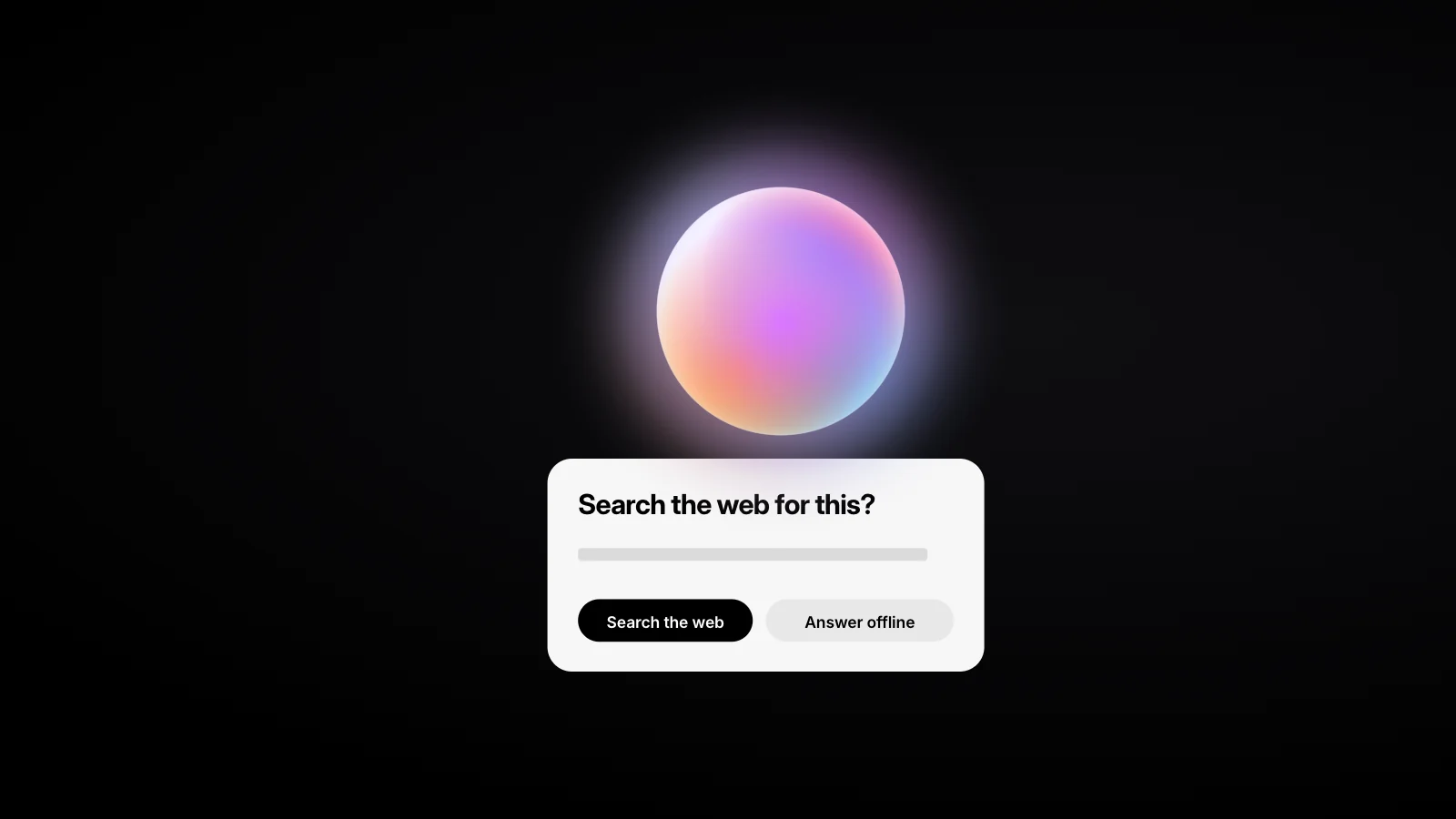
When the check fires, the reply pauses with the status “Needs the web” and Brello shows a card. The card is the whole consent interaction: a title, two sentences, two buttons and a footnote, each with one job. Figure 2 recreates it with its exact copy.
What’s new in AI this week?
Needs the web
Search the web for this?
This looks like it needs up-to-date information. Brello can look it up straight from your phone — the AI still runs on-device.
Search the webAnswer offline
Choosing search turns on web search. You can switch it off anytime from +.
- “Search the web for this?” The title asks about this message only, names the action and waits. Nothing is sent until the person chooses.
- “This looks like it needs up-to-date information.” It gives the reason, and “looks like” is accurate about what the check is: an inference from wording, not a certainty.
- “Brello can look it up straight from your phone — the AI still runs on-device.” It says what would change and what would not. The lookup goes directly from the phone, and the model that reads the results and writes the answer stays on it.
- “Search the web” and “Answer offline”. Both buttons are verbs and both lead to an answer. Declining is not “Cancel”. It is a real choice with a useful result, which is what Schaub and colleagues ask of a blocking control.3
- “Choosing search turns on web search. You can switch it off anytime from +.” It states the lasting consequence before the choice is made, and names the way back.
What the choice changes
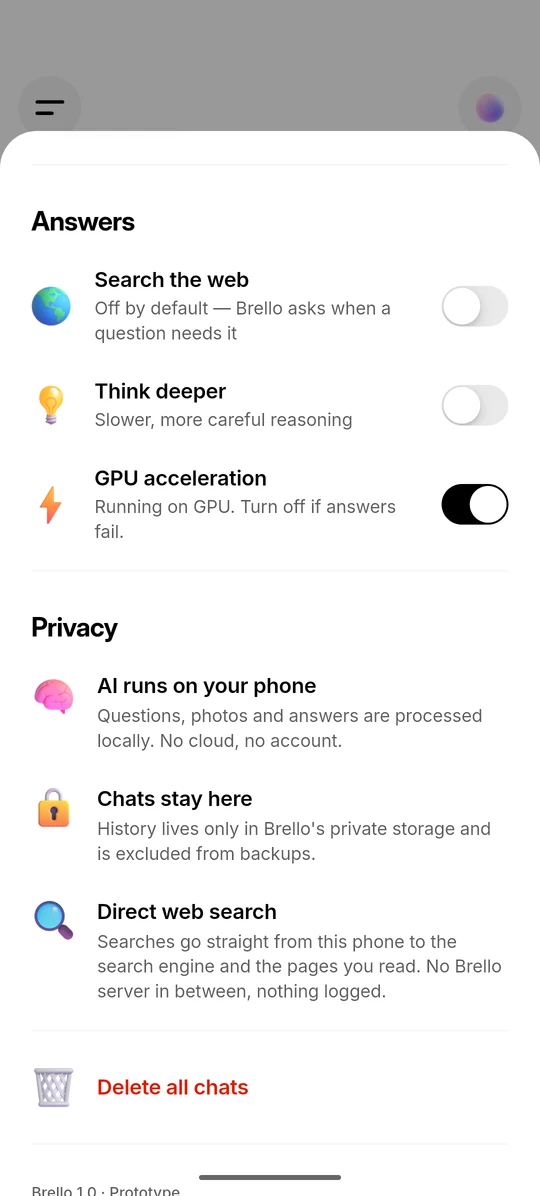
Choosing “Search the web” does two things: it runs the search for this question, and it turns web search on for the questions that follow. While search is on, a “Web search” chip sits in the input bar. Search can be switched off from the + menu, which confirms with a “Web search off” toast, or with the “Search the web” switch in Settings, shown in Figure 3. Choosing “Answer offline” leaves search off, and the next time-sensitive question brings the card back.
One decision rather than a prompt for every message
We chose a single decision that lasts until it is reversed. Asking before every search would look stricter, but someone following a live story would see the same card on every question, and a prompt seen that often stops being read.36 The decision is stated with its consequence, can be reversed from two places, and stays visible as the chip for as long as it lasts. The cost is granularity: after one yes, later searches are not confirmed one by one. Whether people understand a lasting yes as intended is an open question, discussed in section 11.
07
From question to search query
When a search runs, Brello rewrites the question on the phone into a short query, and that query is the only text from the conversation that the search engine receives. People ask the way they would ask a friend, and a search query is shorter and leads with keywords. Because the rewriting runs before anything is sent, it also fixes exactly what leaves the phone. Figure 4 applies each rule to the app’s own examples.
-
01Instructions removed
Why is the sky blue?Keep it short.
Why is the sky blue
-
02Contractions expanded
what’s
whatis
-
03“What’s new in X” to “latest X news”
What’s new inAIthis week?
latestAInewsOctober 2026
-
04Month and year added
latest iPhone release
latest iPhone releaseOctober 2026
Never datedweather · scores · prices · stocks · rates · traffic
-
05Follow-up expanded
Previous questionWho is the author of the novel The Remains of the Day?10 words
how old is he?
WhoistheauthorofthenovelTheRemainsofhow old is he?
- Instructions about the answer are removed. “Keep it short.” tells the model how to reply, so it is not sent to the search engine.
- Contractions are expanded: “what’s” becomes “what is”. Each rule is a fixed text transformation that runs on the phone before anything is sent.
- “What’s new in X” becomes “latest X news”. The app’s own example also gains the month and year, giving “latest AI news October 2026”.
- A time-relative question without a year gains the month and year. Live data is the exception: weather, scores, prices, stocks, rates and traffic are left undated.
- A short or referential follow-up borrows the first ten words of the previous question. Those words leave the phone with the query, so they count as part of what is sent.
- Instructions about the answer are removed. “Keep it short.”, “in two sentences”, “ELI5” and “please” tell the model how to reply, and a search engine has no use for them.
- Contractions are expanded, so “what’s” becomes “what is”.
- A common phrasing is rewritten. “What’s new in X” becomes “latest X news”.
- Time-relative questions gain a date. A question with no year gets the current month and year, so that the query names the period the person means: “latest iPhone release” becomes “latest iPhone release October 2026”. Live data is the exception, and questions about weather, scores, prices, stocks, rates and traffic are left undated.
- Follow-ups borrow context. A message of four words or fewer, or one that refers back with words such as “he”, “it”, “that” or “they”, gets the first ten words of the previous question placed in front of it. On its own, “how old is he?” means nothing to a search engine.
Only the last rule carries words from earlier in the conversation, so a follow-up search can send up to ten words of the previous question. For that reason we list it with the privacy properties in section 9. What happens after the query leaves, from the provider chain to BM25 passage ranking, is described in “Answering from the open web, without a server”.
08
Showing what happened
Brello 1.0 reports whether the web was used twice: in the reply’s status line while the reply is being made, and in its meta line once it is finished.
During a search, the status line beside the reply’s orb moves through “Searching the web”, then “Reading 4 sources” with small letter marks for the sites being read, then “Thinking”. Without a search it goes straight to “Thinking”, or to “Reasoning” in Think harder mode. It ends on the name of the model that wrote the answer. Figure 5 shows both paths.
Web search used
What’s new in AI this week?
1
2
No web search
Write a poem about autumn
- The status line says what the reply is doing. With search on, it starts at “Searching the web” while the phone sends the query to a search engine.
- “Reading 4 sources” shows which sites are being read. The letter marks are drawn on the phone, so no request goes to a site for its icon.
- “Thinking” means the on-device model is at work. In Think harder mode, the same label reads “Reasoning”.
- The label ends on the model’s name, and the meta line records the web. Source cards sit above the answer and “3.1s · Web + on-device” sits below it.
- Without a search, the reply goes straight to “Thinking”. A creative task such as “Write a poem about autumn” is not searched even with search on, and its meta line reads “2.4s · On-device”.
Every finished answer then carries a quiet meta line beside a lock, such as “3.1s · Web + on-device” or “2.4s · On-device”, giving the time taken and whether the web was used. The meta line records whether web results were given to the model, and the numbered citations show which pages it relied on: a web answer shows source cards above its text, and each citation opens its page. A “Web + on-device” answer can still draw on the model’s own knowledge, because the prompt tells it to answer from general knowledge when the results do not answer the question. The letter marks on the cards are drawn on the phone, so showing a source sends no request to the site.
Every notice, by timing
Table 2 places each notice in Brello 1.0 in the design space of Schaub and colleagues.3 All of them are visual and appear on the phone itself.
| Notice | When it appears | Timing |
|---|---|---|
| Onboarding screen, “The web, answered.” | On first run | At setup |
| Settings: “Search the web”, with “Off by default — Brello asks when a question needs it” | Whenever Settings is opened | On demand |
| Settings: “Direct web search” | Whenever Settings is opened | On demand |
| Permission card, “Search the web for this?” | Search is off and a question looks time-sensitive | Just in time |
| Toast, “Web search on” or “Web search off” | The setting is changed from the + menu | Just in time |
| “Web search” chip in the input bar | While search is on | Persistent |
| Status line, “Searching the web” and “Reading 4 sources” | While a search runs | Persistent, while active |
| Meta line, “Web + on-device” or “On-device” | Under every finished answer | After the fact |
The design gives notice at setup, on demand, just in time and persistently. Only the card blocks: the reply waits until the person chooses, and the Settings switch is a control decoupled from any notice. The meta line is the one element without a counterpart in the taxonomy. It is not a notice about a practice in progress but a record attached to each answer, which is where we think an after-the-fact disclosure belongs.
09
Privacy properties
A search sends two kinds of request directly from the phone: the query to a search engine, and ordinary page requests to up to four websites in the results. Table 3 lists everything that leaves during a search, and to whom.
| When | What is sent | To whom |
|---|---|---|
| A search runs | The query: the rewritten question, sometimes with up to ten words of the previous question | The search engine that answers: DuckDuckGo, Bing, Brave Search, Google News (RSS) or Wikipedia |
| The results are read | Ordinary page requests for up to four result pages | The websites in the results |
| A source card or citation is tapped | The page is opened | The phone’s own browser |
The engines are tried in a fixed order until one returns relevant results, and a provider that fails or is blocked is rested for two minutes, so a single search can reach more than one engine. Search and page requests carry the Do Not Track and Global Privacy Control signals, DNT: 1 and Sec-GPC: 1.78 The rest of the conversation, any photo and the answer stay on the phone, and the model that reads the pages and writes the reply runs there too. There is no Brello server, proxy or relay, so there is nothing for us to log.
The invisible browser that runs searches exists only while it is needed. It warms up only when search is on, and after three idle minutes it is torn down and its cookies, cache and local storage are wiped. Results are cached in memory for fifteen minutes to avoid repeat lookups, and are gone when the app closes.
Asking does not change what the other side sees. The search engine and the websites receive each request, including the phone’s IP address, as they would for any ordinary web request, and the query still reveals what the question is about. Brello does not hide that, and it adds nothing of its own. That is why the card asks rather than assumes, and why we describe the trade in plain terms. The NIST Privacy Framework treats such description as a function in its own right, Communicate-P: activities that let organisations and individuals reliably understand how data are processed and the privacy risks involved.9 The rest of Brello 1.0’s data handling is covered in its privacy policy.
10
Limitations
The design rests on word lists and fixed rules, so it can be wrong in both directions, and the consent it collects is coarse.
- It can miss. A question can depend on recent facts without using any listed word, such as a question about who holds a particular office. With search off, Brello answers it from the model’s knowledge without asking.
- It can over-ask. A listed word can appear in a question that does not need the web. “What is the history of the stock market?” contains “stock” and may bring up the card, at the cost of one tap.
- The signals are English. The list is made of English words and phrases, like the app’s interface, so a question in another language is less likely to match.
- A yes lasts. One yes turns search on until the person turns it off, and later searches are not confirmed one by one. The chip and the meta line show the state instead.
- Follow-up expansion is a word count. It borrows the first ten words of the previous question whole. They can be cut mid-phrase, as in Figure 4, and can carry details the person did not think of as part of the new question.
- A photo question never gets current facts. The photo rule keeps every photo question on the phone, including one where fresh information would help, such as what an item in the photo costs today.
- Search depends on third parties. One provider attempt can take up to 14 seconds, and a search can come back empty, in which case Brello answers from the model’s own knowledge.
- Asking does not change what a search engine sees. The query still reveals the topic, and the engine and websites see the request and the phone’s IP address.
- No user measurements. This paper reports no measurements of how often the check fires, which button people choose, or whether they understand the card. Brello 1.0 contains no analytics, so such data would have to come from a study.
11
Open questions
Status: design intent, not results. Brello Super Intelligence is in development. This section describes intent for it; the sections above describe Brello 1.0 as built.
Brello Super Intelligence (Brello SI) is in development, and we intend it to keep the rule this paper describes: a reach beyond the device waits for the person’s decision. The Brello Charter, version 1.0, describes the open web as a layer Brello SI is intended to use only when the person allows it (section 4), and commits us to asking before Brello spends money, sends a message or deletes something on their behalf (commitment 05). Read the Brello Charter.
- How consent should scale with consequence. A search reveals a query. An action taken for someone can have effects that cannot be undone. We intend each such action to need its own decision, and we have not settled how that request should read.
- How long a yes should last. It could cover one question, one conversation, or everything until it is switched off. Each choice trades attention against granularity, and the card would have to state its scope in a few words.
- Whether the time-sensitivity check can be learned without losing predictability. A model-based check might catch paraphrases that the word list misses, but it would be harder to test and to explain.
- How to tell that a prompt is understood, not just answered. The rate at which people choose each button measures behaviour, not comprehension, and we do not yet have a method we trust for measuring understanding. Our approach to pre-release evaluation is set out in “Evaluate first, then ship”.
- What a request to use private compute should say. When work has to leave the device, the request has more to explain than a search does: where the work runs, what is kept and how that can be checked. The design space is set out in “Private compute you can verify: the design space”.
We intend Brello SI to keep the three parts of this design for every request that leaves the device: it will ask first, give the reason, and record afterwards what was sent.
References
- European Parliament and Council of the European Union. Regulation (EU) 2016/679 (General Data Protection Regulation), Article 25, “Data protection by design and by default”. Official Journal of the European Union, L 119, 4 May 2016, pp. 1–88. eur-lex.europa.eu/
eli/ . Accessed 5 October 2026.reg/ 2016/ 679/ oj - Ann Cavoukian. “Privacy by Design: The 7 Foundational Principles.” Information and Privacy Commissioner of Ontario, 2009; revised 2011.
- Florian Schaub, Rebecca Balebako, Adam L. Durity and Lorrie Faith Cranor. “A Design Space for Effective Privacy Notices.” Eleventh Symposium on Usable Privacy and Security (SOUPS 2015), USENIX Association, 2015. usenix.org/
conference/ soups2015/ proceedings/ presentation/ schaub - Adrienne Porter Felt, Elizabeth Ha, Serge Egelman, Ariel Haney, Erika Chin and David Wagner. “Android Permissions: User Attention, Comprehension, and Behavior.” Symposium on Usable Privacy and Security (SOUPS 2012), Washington, DC, 2012. cups.cs.cmu.edu/
soups/ 2012/ proceedings/ a3_Felt.pdf - Android Developers. “Request runtime permissions.” developer.android.com/
training/ . Accessed 5 October 2026.permissions/ requesting - Rainer Böhme and Stefan Köpsell. “Trained to Accept? A Field Experiment on Consent Dialogs.” Proceedings of the SIGCHI Conference on Human Factors in Computing Systems (CHI 2010), ACM, 2010, pp. 2403–2406. doi.org/
10.1145/ 1753326.1753689 - W3C. “Tracking Preference Expression (DNT).” W3C Working Group Note, 17 January 2019. w3.org/
TR/ . Accessed 5 October 2026.tracking-dnt - W3C. “Global Privacy Control (GPC).” W3C Working Draft, 24 September 2026. w3.org/
TR/ . Accessed 5 October 2026.gpc - National Institute of Standards and Technology. “NIST Privacy Framework: A Tool for Improving Privacy through Enterprise Risk Management, Version 1.0.” NIST Cybersecurity White Paper, 16 January 2020. doi.org/
10.6028/ NIST.CSWP.01162020
Cite this work
Brello Research. “Asking before going online: consent for web search.” Stuvio, 5 October 2026. https://brello.ai/research/asking-before-going-online/
@misc{brello2026askingbefore,
  title  = {Asking before going online: consent for web search},
  author = {{Brello Research}},
  year   = {2026},
  month  = {oct},
  url    = {https://brello.ai/research/asking-before-going-online/},
  note   = {Stuvio}
}Version history
- 1.0First published.