01
Overview: the phone is the computer
Brello 1.0, a prototype Android app that runs language models entirely on the phone, has no server to fall back on, so each model has to fit the phone it runs on.
A cloud assistant chooses its hardware once, in a data centre. An on-device assistant runs on whatever phone it is installed on. Brello 1.0 supports 64-bit ARM phones running Android 8.0 or newer, and within that range phones differ in memory, free storage and graphics hardware. A model that runs well on one phone can fail to start on another.
This paper describes how Brello makes that fit, from choosing a model to recovering when one can’t start. Brello uses a short sequence of fixed rules, and the sections below follow them in the order they run. Brello offers three models of different sizes (Section 2) and recommends one from the phone’s memory (Section 3). It checks free storage before downloading (Section 4) and keeps the download running while the app is in the background (Section 5). On first load it tunes the model for the phone’s chip and runs it on the GPU or the CPU (Section 6), and it recovers when a model turns out to be too big (Section 7). For the general picture, read On-device AI, explained and Running a language model on an Android phone.
Facts in this paper describe Brello 1.0 (version 1.0.0, build 1) as of 5 October 2026. Every number is one the app uses, and the Brello 1.0 system card collects them in one place. We report no speed or accuracy measurements.
02
Three models, three footprints
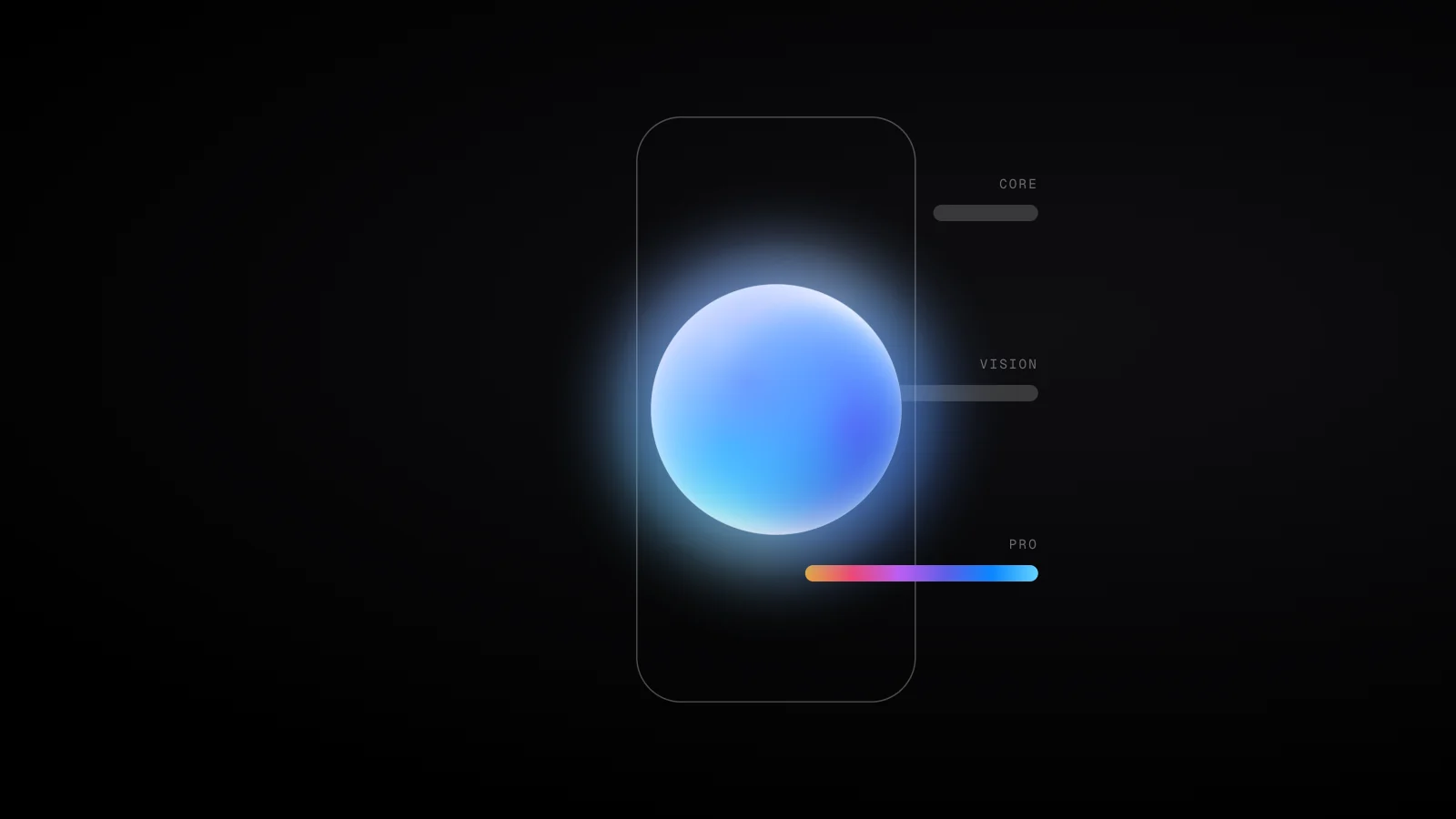
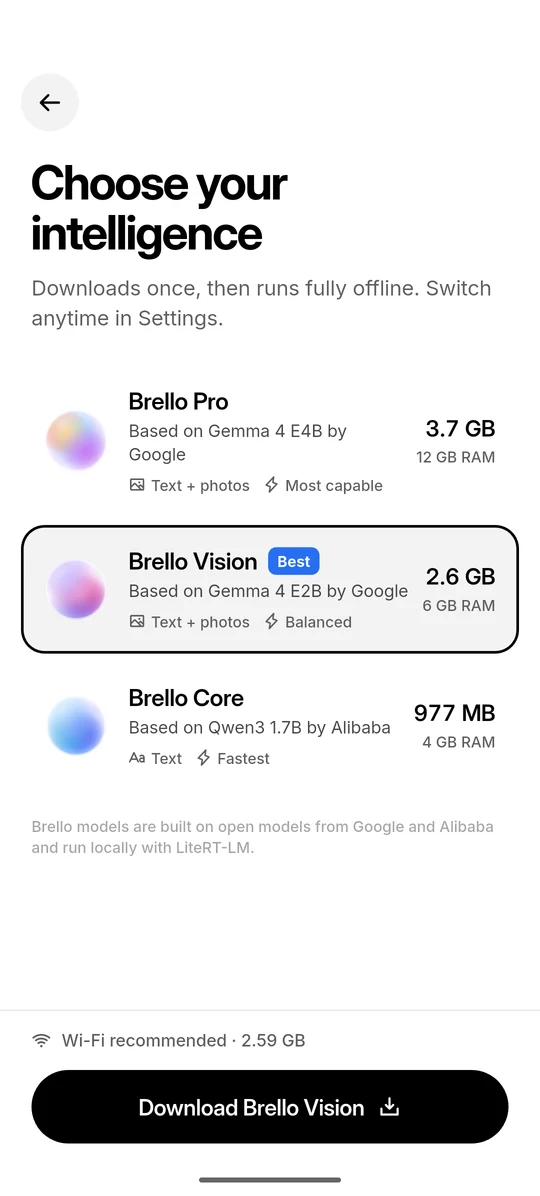
Brello 1.0 offers three models, and each has a fixed storage cost and a recommended amount of memory. All three are open models released under the Apache 2.0 licence, packaged for Google’s LiteRT-LM runtime1 and downloaded from Hugging Face without an account or token.2
The app always names the model underneath. Brello Pro is based on Gemma 4 E4B by Google, Brello Vision on Gemma 4 E2B by Google, and Brello Core on Qwen3 1.7B by Alibaba. Brello is not affiliated with or endorsed by Google or Alibaba. Table 1 lists what each model needs, and the Brello 1.0 model pages give each one’s full specification.
| Property | Brello Pro | Brello Vision | Brello Core |
|---|---|---|---|
| Tier | Most capable | Balanced | Fastest |
| Based on | Gemma 4 E4B | Gemma 4 E2B | Qwen3 1.7B |
| Input | Text and photos | Text and photos | Text |
| Download | 3.66 GB | 2.59 GB | 977 MB |
| Speed cache, written on first load | ≈2.60 GB | ≈1.01 GB | ≈974 MB |
| Total storage used | ≈6.26 GB | ≈3.60 GB | ≈1.95 GB |
| Recommended memory | 12 GB | 6 GB | 4 GB |
Sizes here, as in the app, use decimal units: 1 GB is 1,000,000,000 bytes. Brello Pro’s download, for example, is 3,659,530,240 bytes, which the app shows as 3.66 GB.
The download is only part of a model’s storage cost. On first load, the runtime writes a speed cache next to the model so that later starts are faster, and the cache’s size relative to the download varies by model (Figure 1). Brello Core’s cache, at about 974 MB, is almost exactly the size of its download. Brello Vision’s, at about 1.01 GB, is two-fifths of its download. Brello uses each model’s own figures when it checks for space, and removing a model frees both the model and its cache.
- Each model downloads once. Brello Pro is 3.66 GB, Brello Vision 2.59 GB and Brello Core 977 MB. Wi-Fi is recommended, and after that the model works offline.
- The first launch writes a speed cache. The runtime tunes the model to the phone’s chip and stores the result, so Brello Pro occupies about 6.26 GB in total.
- Brello checks for room before it downloads. It needs space for the model, its cache and 300 MB of headroom, and says plainly when a phone doesn’t have it.
Show data
| Model | Download | Speed cache | Total | Free space needed |
|---|---|---|---|---|
| Brello Pro | 3.66 GB | ≈2.60 GB | ≈6.26 GB | ≈6.56 GB |
| Brello Vision | 2.59 GB | ≈1.01 GB | ≈3.60 GB | ≈3.90 GB |
| Brello Core | 977 MB | ≈974 MB | ≈1.95 GB | ≈2.25 GB |
Capability and size move together. Brello Pro and Brello Vision understand photos as well as text, and Brello Pro is the most capable of the three. Brello Core is text only, and it is the fastest and the smallest. All three are small language models, far smaller than frontier cloud models, and they can be wrong. Small models also need care in how they are prompted, which we describe in Small models copy the shape of their instructions. For how model weights are compressed to fit on phones in general, read Quantization, explained.
03
Recommending a model by memory
Brello 1.0 recommends the most capable model that fits the phone’s memory, where a model fits if the phone reports at least 90 percent of the model’s recommended memory. The 10 percent allowance covers the gap between the memory printed on the box and the memory the phone reports.
Storage decides whether a model can be installed. Memory decides whether it can run. The standard way to run a language model is to load the entire model into memory, which limits the size of model a device can run.3 On a phone, that memory is shared with Android and every other open app. Brello 1.0 gives each model a recommended amount of memory: 12 GB for Brello Pro, 6 GB for Brello Vision and 4 GB for Brello Core.
On launch, Brello reads the phone’s total memory from /proc/meminfo, the Linux kernel’s report of memory use.4 The kernel defines that total as usable RAM: physical memory minus a few reserved areas and the kernel’s own code. So the reading sits a little below the advertised figure. A phone sold with 12 GB reports about 11.2 GB, and compared directly with 12 GB it would fail Brello Pro’s requirement. Equation 1 states the rule that allows for this.
/proc/meminfo, and Rrec(m) is the recommended memory for model m. The rule sets fit thresholds of 10.8 GB for Brello Pro, 5.4 GB for Brello Vision and 3.6 GB for Brello Core.Brello then recommends the most capable model that fits. Figure 2 applies the rule to phones sold with 12, 8, 6 and 4 GB of memory, and to a phone whose memory can’t be read.
- Brello reads the phone’s total memory. The reading is lower than the RAM on the box: a 12 GB phone reports about 11.2 GB, and the dashed ends show the difference.
- Each threshold is 90 percent of a model’s recommended memory. Measured strictly, a 12 GB phone would miss Brello Pro’s 12 GB. The allowance sets the thresholds at 10.8, 5.4 and 3.6 GB.
- A 12 GB phone clears all three thresholds. Brello recommends the most capable model that fits, so Brello Pro gets the “Best” badge.
- 8 GB and 6 GB phones get Brello Vision. The 6 GB phone reports 5.6 GB. A strict 6 GB test would rule it out, but it clears the 5.4 GB threshold.
- A 4 GB phone just clears Brello Core’s threshold. It reports about 3.7 GB against 3.6 GB. A phone below every threshold is recommended Brello Core too.
- If the memory can’t be read, Brello recommends Brello Vision. It is the balanced middle tier. Every recommendation is preselected in onboarding and can be changed.
Show data
| Phone (advertised) | Reports | Brello Pro, 10.8 GB | Brello Vision, 5.4 GB | Brello Core, 3.6 GB | Recommended |
|---|---|---|---|---|---|
| 12 GB | ≈11.2 GB | Fits | Fits | Fits | Brello Pro |
| 8 GB | ≈7.4 GB | No | Fits | Fits | Brello Vision |
| 6 GB | ≈5.6 GB | No | Fits | Fits | Brello Vision |
| 4 GB | ≈3.7 GB | No | No | Fits | Brello Core |
| Below every threshold | under 3.6 GB | No | No | No | Brello Core |
| Memory unknown | no reading | – | – | – | Brello Vision |
Two cases show why the details matter. A 6 GB phone reports about 5.6 GB. A strict 6 GB test would rule out Brello Vision, but the 5.4 GB threshold doesn’t. A 4 GB phone reports about 3.7 GB and clears Brello Core’s threshold by about 0.1 GB. A phone below every threshold is still recommended Brello Core, the smallest model, and a phone whose memory can’t be read is recommended Brello Vision. The rule is covered by the app’s unit tests.
The recommendation is preselected during onboarding and marked with a blue “Best” badge wherever models are listed. It is a default, not a restriction. If someone chooses a model that needs more memory than the phone has, Brello warns before downloading, names the better fit and leaves the decision with them:
The rule has a known gap. It reads the phone’s total memory, not the memory that is free when a model loads, so it can’t see what other apps are using at that moment. Section 7 describes how Brello recovers when that gap matters.
04
Checking storage before a multi-gigabyte download
Before a download starts, Brello 1.0 checks that free storage covers the model, its speed cache and 300 MB of headroom. If it doesn’t, the download doesn’t begin, and Brello shows the exact numbers.
Free space comes from Android’s StatFs API,5 which the app reads through a small piece of native Kotlin code. The speed cache has to be counted even though it isn’t written until the first load. A check on the download alone could pass and leave no room for the cache that follows. Table 2 gives the totals.
| Model | Download | Speed cache | Headroom | Free space needed |
|---|---|---|---|---|
| Brello Pro | 3.66 GB | ≈2.60 GB | 300 MB | ≈6.56 GB |
| Brello Vision | 2.59 GB | ≈1.01 GB | 300 MB | ≈3.90 GB |
| Brello Core | 977 MB | ≈974 MB | 300 MB | ≈2.25 GB |
If the space isn’t there, Brello doesn’t start a download that can’t finish. It shows a dialog with the exact numbers and a single “OK” button:
Storage gets a hard check and memory a soft one because the two failures differ. A file that doesn’t fit can’t be written, so a storage shortfall always fails. A memory shortfall is a risk: the model may run slowly, or it may not start. So Brello stops the first and warns about the second.
05
A download that survives leaving the app
Brello 1.0 runs each model download as an Android foreground service, so the download continues while the app is in the background, and it retries automatically up to 10 times.
Downloads of 977 MB to 3.66 GB take minutes, and people switch apps sooner than that. A foreground service shows a notification while it works and keeps running when the app isn’t on screen.6 Brello’s foreground-service, notification and wake-lock permissions exist for this one job. Only one download runs at a time, and the current model keeps working while another downloads, so someone moving from Brello Core to Brello Vision keeps an assistant in the meantime. When a download fails, the message says why, for example “No connection. Check your internet and try again.”
The download is also the only step in this process that uses the network. The phone sends a standard file request to Hugging Face, with no account or token. The memory reading, the storage check, the choice of GPU or CPU and the record of a crash during loading are all made and kept on the phone. Brello has no server to send them to, and the app contains no analytics or crash-reporting SDK. After the download, the model works offline. The privacy overview covers the rest of the app, including optional web search, in which the search text and page requests go directly from the phone to a search engine and websites, which see a normal web request.
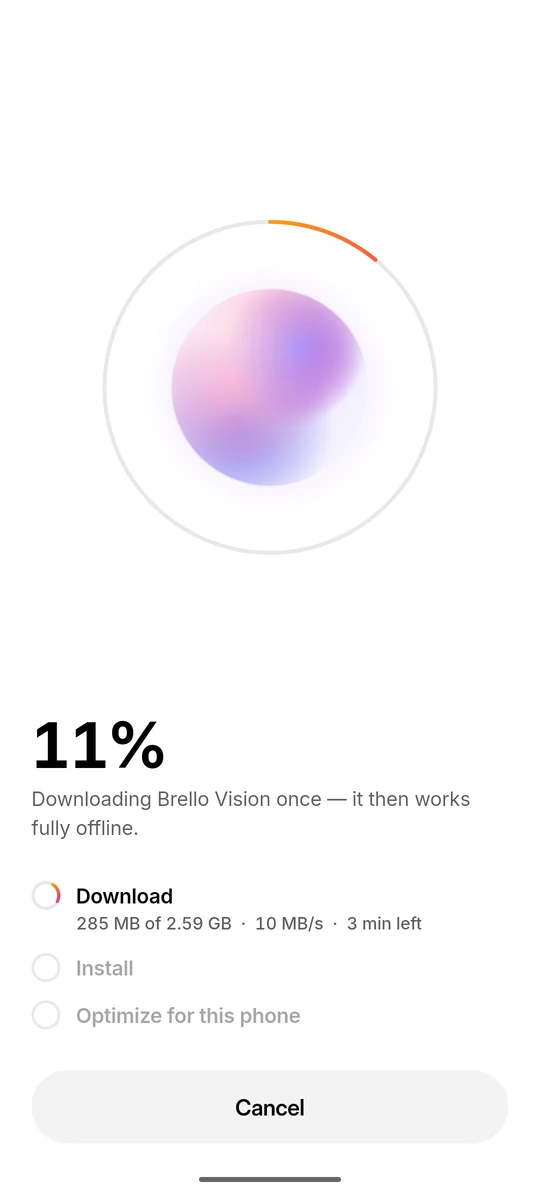
During onboarding, the download screen shows a progress ring around the model’s orb, the percentage, the amount received, the speed and the time left (Figure 3). Beneath it, a three-step checklist names the whole job: “Download”, “Install” and “Optimize for this phone”. Install verifies and unpacks the model on the phone. We describe the ring and the orb in Designing an intelligence you can see working.
06
The first load: weight cache, GPU and CPU
On a model’s first load, Brello 1.0 builds a weight cache tuned to the phone’s chip, which takes up to a minute, and it runs the model on the GPU where it can and on the CPU where it can’t.
The weight cache is the speed cache from Figure 1. The runtime writes it once, and later starts reuse it. The app is direct about the cost: “Tuning {Model} for this phone’s chip. First launch only — up to a minute.” While it runs, the checklist counts the seconds.
Brello tries the GPU first. GPU inference goes through OpenCL,7 which the app enables through native library hooks on Android 12 and later. If the GPU path can’t load, Brello falls back to the CPU without showing an error. There the runtime uses XNNPACK,8 Google’s library of neural-network inference operators, with its own weight cache. The CPU is usually slower, but every supported phone has one. GPU acceleration is on by default. Settings shows where the model runs, “Running on GPU” or “Running on CPU”, and the switch carries the hint “Turn off if answers fail.”
Brello also starts loading the model while the app draws its first frame, rather than waiting for the first question, so the model is usually ready by the time someone starts typing.
07
States, failures and crash-loop recovery
Each Brello 1.0 model is in one of five engine states (none, installed, loading, ready or failed), and every failure has a defined way back. Even a model that crashes the whole app costs one failed start, not an app that won’t open.
A coloured dot in the top bar shows the state: grey for none, amber and pulsing while the model starts, green when it is ready and red when it has failed. While a model loads, a banner reads “Starting Brello Vision”, and in Settings the model’s pill reads “Starting”, “Active” or “Error”. Figure 4 follows one model through these states on an 8 GB phone, then shows the crash path.
- Brello Vision starts as none: not on the phone. On an 8 GB phone it is the recommended model, so it carries the “Best” badge. The status dot is grey.
- The download runs as a foreground service. The 2.59 GB file comes straight from Hugging Face without an account or token, keeps going in the background and retries automatically up to 10 times.
- Install verifies and unpacks the model. The engine state becomes installed: the model is on the phone but not yet loaded.
- Loading tries the GPU first, through OpenCL. Here the GPU can’t load, so Brello falls back to the CPU without showing an error. The first load also tunes the model for the chip, which takes up to a minute.
- The model is ready, and the status dot turns green. Settings shows where it runs, here “Running on CPU”. From here on, chat works offline.
- If a model crashes the app while loading, Brello remembers. Here Brello Pro, downloaded anyway, takes the app down. On the next launch Brello switches to Brello Vision and says why, instead of crashing again.
Most failures leave the app running. The engine moves to failed, the dot turns red, and a banner offers a way forward: “Model didn’t start · Tap to retry”, or “Couldn’t start here · Choose another”.
The harder case is a model too big for the phone. Loading it can take down the whole app, usually because the phone runs out of memory, and then there is no app left to show an error. Without protection, the next launch would load the same model and crash again, and the person would be stuck in a loop.
So Brello records when a model crashed the app while loading. On the next launch it switches to another installed model and says why, instead of crashing again:
With the memory warning before download and crash-loop recovery after a failed load, a model that doesn’t fit costs one failed start. Brello steers people towards a model that fits, and the recovery works after the fact: the app closes once before Brello changes model.
08
Limitations
The rules in this paper are simple by design, and they leave gaps. These are the ones we know about.
- Total memory, not free memory. The recommendation reads the phone’s total memory, so it can’t account for what Android and other apps are using when the model loads. A model that fits on paper can still fail to start, and crash-loop protection handles that only after one failed start.
- Memory is the only input. The phone’s GPU, the speed of its chip and its free storage play no part in the recommendation, so two phones with the same memory get the same recommendation.
- Fixed thresholds. Each threshold comes from one recommended figure per model, not from measurements on individual phones.
- Large downloads. Models range from 977 MB to 3.66 GB, plus a speed cache of about 1 to 2.6 GB, and some phones won’t have room for Brello Pro, which needs about 6.56 GB free.
- A slow first load. It takes up to a minute while the runtime tunes the model, and the CPU fallback is usually slower than the GPU.
- No NPU. Brello 1.0 doesn’t use phones’ neural processing units.
- Android requirements. On Android, Brello 1.0 needs a 64-bit ARM phone running Android 8.0 or newer. This article describes the Android app.
- No measurements. This paper describes rules and behaviour. It reports no speeds, no load times beyond the app’s own “up to a minute” and no accuracy figures for any phone.
09
Implications for Brello Super Intelligence
Brello Super Intelligence is in development. This section describes intent, not results.
Brello Super Intelligence (Brello SI) is being designed in three layers, and the device comes first: whatever can run on the phone is intended to run there. Brello 1.0 is that first layer today, and the practice described in this paper is its groundwork.
We intend to carry the same practice into Brello SI: measure the device before asking anything of it, state what a model costs in storage, memory and time in plain numbers, prefer a quiet fallback to an error, and stop a single failure from turning into a loop. Brello SI is being designed to send work beyond the phone only when a task needs more than the device can give, and then only to sealed compute that the device has verified. Deciding what fits on the phone therefore becomes part of deciding where work runs at all.
We don’t yet know how that decision should weigh memory, speed and privacy, or how to state the cost of work that runs partly off the device. Private compute you can verify: the design space sets out our working design for the off-device layer, and the Brello Charter describes all three layers.
References
- Google AI Edge. “LiteRT-LM.” GitHub repository. github.com/
google-ai-edge/ . Accessed 5 October 2026.LiteRT-LM - LiteRT Community (formerly TFLite). Model repositories. Hugging Face. huggingface.co/
litert-community . Accessed 5 October 2026. - Alizadeh, K., Mirzadeh, I., Belenko, D., Khatamifard, K., Cho, M., Del Mundo, C. C., Rastegari, M. and Farajtabar, M. “LLM in a flash: Efficient Large Language Model Inference with Limited Memory.” In Proceedings of the 62nd Annual Meeting of the Association for Computational Linguistics (ACL), 2024. arXiv:2312.11514.
- The Linux kernel documentation. “The /proc Filesystem.” docs.kernel.org. docs.kernel.org/
filesystems/ . Accessed 5 October 2026.proc.html - Android Developers. “StatFs.” Android API reference. developer.android.com/
reference/ . Accessed 5 October 2026.android/ os/ StatFs - Android Developers. “Foreground services overview.” developer.android.com/
develop/ . Accessed 5 October 2026.background-work/ services/ fgs - The Khronos Group. “OpenCL: the open standard for parallel programming of heterogeneous systems.” khronos.org/
opencl . Accessed 5 October 2026. - Google. “XNNPACK.” GitHub repository. github.com/
google/ . Accessed 5 October 2026.XNNPACK
Cite this work
Brello Research. “Fitting a model to the phone in your pocket.” Stuvio, 5 October 2026. https://brello.ai/research/fitting-a-model-to-the-phone/
@misc{brello2026fittinga,
  title  = {Fitting a model to the phone in your pocket},
  author = {{Brello Research}},
  year   = {2026},
  month  = {oct},
  url    = {https://brello.ai/research/fitting-a-model-to-the-phone/},
  note   = {Stuvio}
}Version history
- 1.0First published.