01
Overview: colour is reserved for meaning
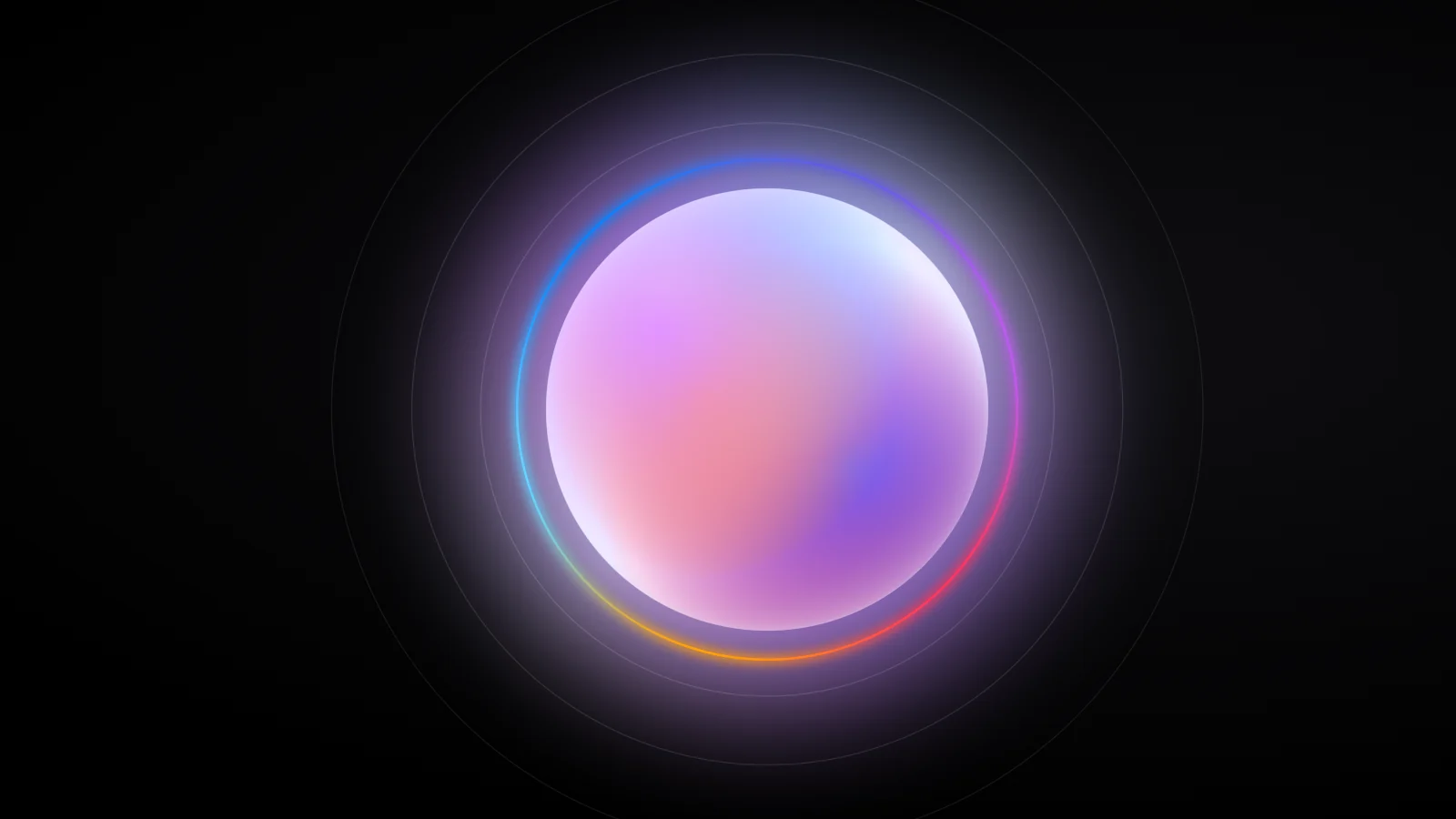
Brello 1.0 shows what its on-device model is doing with two signals: an animated orb that stands for the model, and a spectrum glow around the composer while a reply is written.
Brello 1.0 is a prototype Android app, made by Stuvio, that runs language models entirely on the phone, with no account and no Brello server. Its interface has to show what that model is doing, from resting to searching the web to writing, without filling the screen with status text. This paper describes that AI interface design, with the parameters the app uses. It is a specification of Brello 1.0 as built, and it reports no user measurements.
The design system states the rule that governs everything else: colour is reserved for meaning. The interface is a strict, high-contrast neutral system of black, white and a tight ramp of greys, with true black (#000000) in dark mode. Beyond the greys, colour is given a job: Table 1 lists the semantic colours and what each one marks.
| Token | Light | Dark | Used for |
|---|---|---|---|
| Accent | #276EF1 | #5B91F5 | Citations, the “Best” badge, text selection |
| Positive | #05944F | #06C167 | The “Active” pill and the ready dot |
| Warning | #FFB020 | #FFB020 | The “Starting” pill and the loading dot |
| Negative | #E11900 | #FF4D3A | Errors and delete |
| Spectrum | #FF9F0A → #FF375F → #BF5AF2 → #5E5CE6 → #0A84FF → #64D2FF | The orb, the glow frame and progress rings | |
| MonogramEight colours | #276EF1 #05944F #7356BF #E28454 #1E5F74 #B2433B #333333 #8C6D46 | Source letter marks; the colour comes from a hash of the domain | |
Decorative colour is kept for one subject, the intelligence. Its main form is the orb, a glassy sphere of drifting colour fields that serves as the app icon, the centre of the empty home screen, the avatar beside every reply and the badge for each model. Its companion is the spectrum, the same colours drawn as a glow around the composer and as progress rings.
Two more stated rules shape the motion. The first is “calm by default, alive when working”: idle orbs drift slowly or hold still, and working states speed up, glow and shimmer. Weiser and Brown described calm technology as engaging “both the center and the periphery of our attention” and moving “back and forth between the two”.1 In those terms, a resting orb belongs to the periphery, and a working orb asks for attention. The second rule is “one of each”: one sheet style, one pill button, one press feedback and one motion vocabulary.
Section 2 takes the orb apart, section 3 shows how its speed carries state, and section 4 covers its palettes. Section 5 describes the glow frame and the shimmering status labels, section 6 the paced reveal of an answer, and section 7 reduced motion. Section 8 sets out what we intend for Brello Super Intelligence, and section 9 the limitations.
02
Anatomy of the orb
Brello paints the orb from nine layers, back to front: a halo, a base fill, five colour fields, a glass highlight and a rim. It is drawn rather than loaded as an image, so it stays sharp at every size, from the small avatar beside a reply to the orb of up to 200 pixels on the home screen.
For a canvas of size S, the sphere’s radius R is 0.82 × S/2, multiplied by a slow breath of 1 + 0.025 sin(2.2t), where t is the orb’s phase. The phase starts at 1.7 and advances at the orb’s current speed, so the breath is a ±2.5% swell that takes about 8 seconds at rest and under 2 while Brello works. The nine layers are:
- Halo. A radial glow in the palette’s halo colour that reaches R(1 + 0.22 · glow). The glow value runs from about 0.2 on the smallest orbs to 1.6 on the largest. The halo starts at 0.42 × min(glow, 1.5) opacity on dark backgrounds and 0.24 × min(glow, 1.5) on light ones, and fades to nothing.
- Base. The sphere is clipped to a circle of radius R and filled with #F4F1FF in light mode or #1B1630 in dark mode.
- Five colour fields. Each is a radial gradient from its colour at 92% opacity to transparent, with a centre and a radius that move with the phase.
- Glass highlight. A white radial gradient, still clipped, centred up and to the left at (−0.45, −0.55) in alignment space and fading from 70% to nothing over 0.75 R. It makes the sphere read as glass rather than paint.
- Rim. With the clip removed, a 1 px stroke at radius R − 0.5, white at 16% on dark backgrounds and 55% on light ones.
Figure 1 assembles the layers in that order, then separates them into an exploded view and puts them back together.
- The halo is painted first, outside the sphere. It is a radial glow in the palette’s halo colour, #8E7CFF for Brello Pro, reaching 1.35 times the sphere’s radius on the largest orbs.
- The sphere is clipped to a circle and filled. Its radius R is 82% of half the canvas. The base is #1B1630 in dark mode and #F4F1FF in light mode, and the fields and highlight are drawn inside it.
- Five colour fields drift inside it. Each fades from 92% opacity to nothing and takes its colour, phase offset and speed from the palette, so no two fields move in step.
- A highlight and a rim make it read as glass. A white gradient at 70% sits up and to the left, and a 1 px rim, white at 16% on dark backgrounds, marks the edge.
- Taken apart, the orb is nine layers. One halo, one base, five fields, one highlight and one rim, painted back to front in this order.
- Put back together, the layers make the orb. The app draws it from these layers rather than from an image, so it is sharp at every size.
The fields carry the motion. Each takes a colour, a phase offset and a speed from the model’s palette. Its angle advances with the phase, its distance from the centre swells and shrinks between 0.26 R and 0.50 R, and its radius varies between 0.70 R and 1.00 R, so the fields overlap, part and blend continuously. Figure 2 gives the geometry.
Two details keep the motion from looking mechanical. The vertical position uses 1.3 times the angle, so a field traces a looping, Lissajous-like path rather than a circle, and its distance and size follow their own rhythms, at 0.7 and 1.1 times the phase. Even the field that repeats soonest takes about three minutes at rest to retrace its path. The five offsets also sit about a sixth of a turn apart, from 0 to 4.20 radians, with speeds from 0.65 to 1.20, so no two fields move in step.
03
Speed is the signal
Brello 1.0 has no separate loading state or thinking animation for the orb. Resting and working are the same orb animation at two speeds, 0.35 and 1.6, and the orb eases between them rather than switching.
Speed is how fast the phase advances, in units per second. Every part of the orb’s motion runs on the phase, so a change of speed changes all of it at once: at 1.6 the fields drift about four and a half times faster than at rest, and the breath quickens with them. Each frame, an animating orb runs three lines:
// Each frame, for an orb that is animating
target = active ? 1.6 : 0.35
speed += (target - speed) * min(1, dt * 2.5)
t     += dt * speed
Each frame closes a fixed share of the remaining gap, min(1, 2.5 × dt), where dt is the frame time in seconds. At 60 frames per second that share is 1/24, so the first frame adds 0.052 to the speed and each later frame a little less. The orb accelerates quickly and settles onto its new speed without overshooting. In continuous time this is exponential smoothing with a time constant of 0.4 seconds. Figure 3 plots it frame by frame.
- At rest, the orb drifts at a speed of 0.35. Speed is how fast its phase advances, in units per second, and every part of the orb’s motion runs on that phase.
- When Brello starts working, the target jumps to 1.6. The speed doesn’t jump with it. Each frame, it moves part of the way toward the target.
- Each frame closes 1/24 of the remaining gap at 60 fps. That share is min(1, 2.5 × dt) with dt = 1/60 s, so the first frame adds 0.052 and each later frame a little less.
- After 0.4 s the orb is 64% of the way to 1.6, and after 1.2 s, 95%. The line draws in real time, and the orb above it drifts at the plotted speed.
- When the reply ends, the speed eases back the same way. The target returns to 0.35, and the orb settles along the mirror-image curve without a visible stop.
Show data for Figure 3
| Time | Target | Speed, 60 fps | Speed, 120 fps | Continuous | Change complete |
|---|---|---|---|---|---|
| 0.00 s | 1.6 | 0.350 | 0.350 | 0.350 | 0% |
| 0.25 s | 1.6 | 0.940 | 0.935 | 0.931 | 47% |
| 0.50 s | 1.6 | 1.251 | 1.247 | 1.242 | 72% |
| 0.75 s | 1.6 | 1.416 | 1.412 | 1.408 | 85% |
| 1.00 s | 1.6 | 1.503 | 1.500 | 1.497 | 92% |
| 1.25 s | 1.6 | 1.549 | 1.547 | 1.545 | 96% |
| 1.50 s | 1.6 | 1.573 | 1.572 | 1.571 | 98% |
| 1.75 s | 1.6 | 1.586 | 1.585 | 1.584 | 99% |
| 2.00 s | 1.6 → 0.35 | 1.592 | 1.592 | 1.592 | 99% |
| 2.25 s | 0.35 | 1.006 | 1.010 | 1.015 | 47% back |
| 2.50 s | 0.35 | 0.697 | 0.701 | 0.706 | 72% back |
| 2.75 s | 0.35 | 0.533 | 0.537 | 0.540 | 85% back |
| 3.00 s | 0.35 | 0.447 | 0.449 | 0.452 | 92% back |
| 3.25 s | 0.35 | 0.401 | 0.403 | 0.405 | 96% back |
| 3.50 s | 0.35 | 0.377 | 0.378 | 0.379 | 98% back |
| 3.75 s | 0.35 | 0.364 | 0.365 | 0.366 | 99% back |
| 4.00 s | 0.35 | 0.358 | 0.358 | 0.358 | 99% back |
Simulated with speed += (target − speed) × min(1, 2.5 × dt), starting at 0.35. The continuous column is 1.6 − 1.25e−2.5τ while working and its mirror image after the reply ends. “Change complete” is measured from the speed at the moment the target last changed.
The speed is 64% of the way to its target after 0.4 s and 95% after 1.2 s. Because the share is scaled by the frame time, the curve barely depends on the frame rate: at 0.4 s the orb is 64.0% of the way there at 60 frames per second, 63.6% at 120 and 64.8% at 30. The rule is symmetric, so when the work ends the speed eases back to 0.35 along the mirror-image curve.
Stillness is part of the vocabulary too. Once a reply is finished, the small orb beside it doesn’t animate at all, so in a long conversation motion points to the one reply still being written. The speed has only two targets, which means the orb shows that Brello is working but not how far along the work is (section 9).
04
One orb for each model
Each Brello model has its own orb palette of five field colours and a halo, listed in Table 2. Only the colours differ: the offsets and speeds are the same in all three palettes, so every model moves the same way.
| Model and palette | Field colours, in painting order | Halo |
|---|---|---|
| Brello ProSpectrum | #FF375F #5E5CE6 #64D2FF #FF9F0A #BF5AF2 | #8E7CFF |
| Brello VisionViolet | #BF5AF2 #FF375F #5E5CE6 #FF7AB6 #7D5CFF | #B07CFF |
| Brello CoreOcean | #0A84FF #64D2FF #5E5CE6 #30D5C8 #3B6CFF | #4FA3FF |
The orb beside a reply takes the palette of the model that wrote it. Every reply records its model, so an old conversation keeps the right name and orb after a switch. Colour identifies the model and motion shows what it is doing. Once a chat starts, colour is not the only cue: the model’s name appears in the top bar and on every finished reply. On the empty home screen the orb appears without a name (section 9). Which model Brello recommends depends on the phone’s memory, as described in Fitting a model to the phone in your pocket. Figure 4 renders the three palettes live.
Brello Pro
Spectrum palette
Brello Vision
Violet palette
Brello Core
Ocean palette
These orbs are rendered with WebGL 2,2 from the app’s algorithm: the same five fields with the same offsets and speeds, driven by the same phase and easing, and evaluated for every pixel in a fragment shader. Large renders on the web get additions that a small avatar on a phone doesn’t need. The fields are sampled as if painted on a sphere, so they compress toward the edge. A soft shadow and a lit edge give the glass depth, a wide bloom tinted by the nearest field spills onto the page, and the fields lean gently toward the pointer. A large orb on this site is therefore not pixel-identical to the app’s, while Figures 1, 3 and 5 follow the app’s parameters directly.
05
The glow frame and the shimmer
While Brello is generating a reply, a spectrum glow runs around the edge of the composer: a conic gradient of the six spectrum colours that turns once every 3.2 seconds.
The composer is also where the send button becomes a stop button while the model runs, so the working signal appears there as well as on the orb. The sweep runs from orange through pink, purple, indigo and blue to cyan, and back to orange. It is drawn twice around the composer’s rounded rectangle, which has a corner radius of 30. Underneath, a 6 px stroke of the sweep is blurred (σ ≈ 8 px) and set at 55% opacity, giving soft light on both sides of the edge. On top, a crisp 1.5 px stroke, inset by 0.75 px, draws the edge at full opacity. The frame fades in and out over 520 ms, the system’s slow motion token, so it never snaps on or off. Figure 5 builds it layer by layer, and Figure 6 shows it in the app.
- At rest, the composer has no colour. It is a grey container with a corner radius of 30, holding the + button, the text field and the send button.
- The colour comes from a conic sweep. The six spectrum colours, orange through pink, purple, indigo and blue to cyan, run around the composer’s centre, and the sweep turns once every 3.2 s.
- While Brello generates, a soft layer glows on both sides of the edge. It is a 6 px stroke of the sweep, blurred with σ ≈ 8 px and drawn at 55% opacity, so it is wide and faint. The send button is now a stop button.
- A crisp layer draws the edge itself. It is a 1.5 px stroke at full opacity, inset 0.75 px so that it sits just inside the container.
- The frame fades in and out over 520 ms. It appears when a reply starts and leaves when the reply ends, so the signal never snaps on or off.
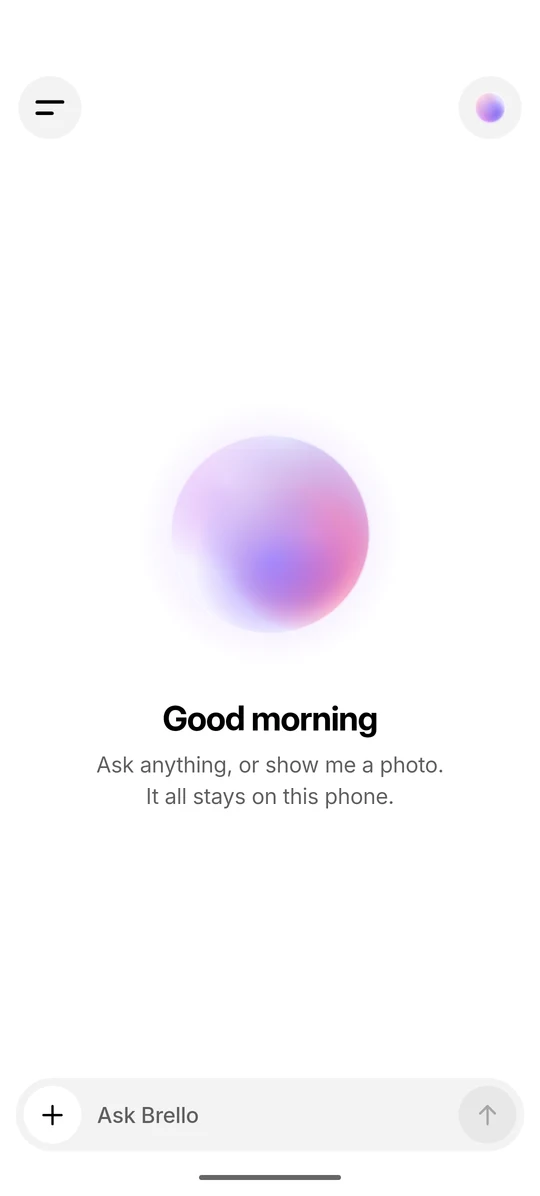
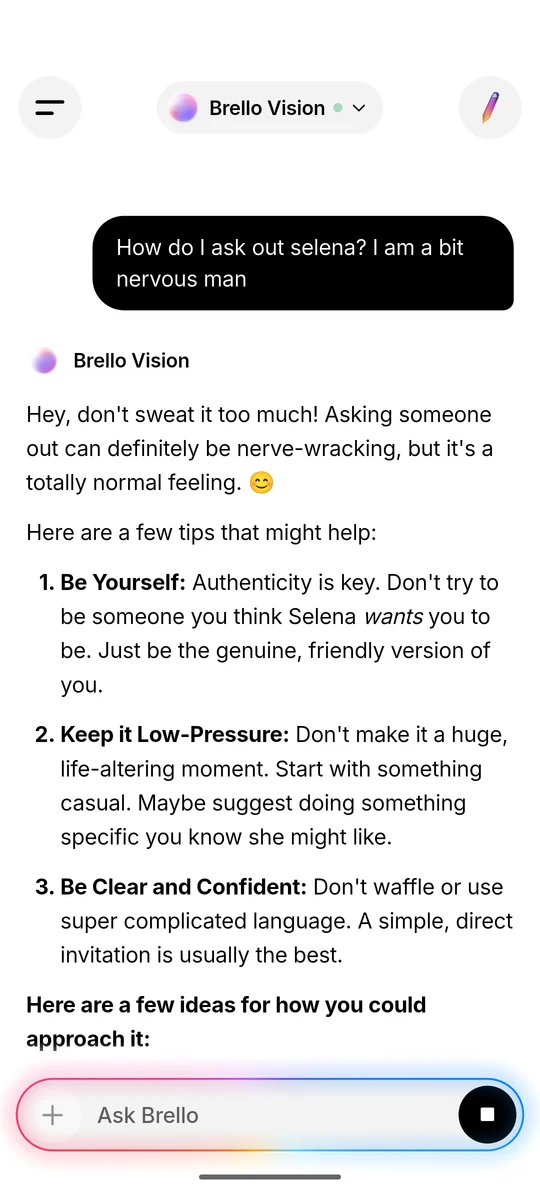
On this site the same frame is a reusable component built from a CSS conic-gradient(),3 masked to a ring, with a blurred copy behind it. Its angle is a custom property registered with @property,4 which lets the browser interpolate the angle and animate the rotation smoothly.
Status text gets a quieter version of the same idea. While a reply is in progress, the line above it names the stage: “Searching the web”, then “Reading 4 sources” with small letter-mark badges for the sites, then “Thinking”, or “Reasoning” in Think harder mode. When the reply is finished, the label becomes the name of the model that wrote it. The web stages are described in Answering from the open web, without a server.
Live labels shimmer. The text is painted with a gradient from the tertiary grey to full-strength text and back, and the bright band sweeps from left to right every 1.5 s. Its stops sit at v − 0.25, v and v + 0.25, with v running from −0.7 to 1.7, so the band enters and leaves beyond the ends of the label and crosses the text for about 0.94 s of each sweep.
Think harder mode applies the same treatment to reasoning. A “Thought process” panel appears above the answer. While the model reasons, the panel’s title shimmers and it shows the last few lines of live reasoning, fading out at the top. When reasoning ends, the panel collapses to a “Thought process” row that expands to show the full reasoning. Reasoning modes, explained covers what such a mode changes in a model’s output.
06
Writing at a readable pace
Brello 1.0’s streaming text animation reveals an answer at a steady, frame-synced pace rather than as tokens arrive, because a model on a phone produces text in bursts.
Incoming text joins a backlog, and a typewriter reveals it at about 70 characters a second plus five times the backlog while the model streams, then at 260 plus eight times the backlog to finish. The backlog term drains bursts quickly: with no new text arriving, a backlog of 100 characters clears in about 0.4 s while streaming and in under 0.2 s at the end, so the tail lands at once instead of trickling out.
The reveal never shows half-written Markdown. A lone ** or backtick stays hidden until its partner arrives, a partial citation such as [3 is held back until it is complete, and a list marker with nothing after it isn’t shown. Finished replies keep their parsed Markdown, so they aren’t parsed again while another answer streams. The text also passes through guards against leaked control tags and repetition loops, described in Small models copy the shape of their instructions.
The reveal can be felt as well as seen: a tick plays the moment an answer starts writing, and a light tap when it finishes. Each finished answer then closes with a quiet meta line such as “2.4s · On-device” or “3.1s · Web + on-device”, recording how long it took and whether the web was used. Table 3 lists every working signal in Brello 1.0.
| Signal | When | Timing |
|---|---|---|
| Orb drift | Any animating orb; faster while Brello works | 0.35 at rest, 1.6 working, eased at min(1, 2.5 × dt) per frame |
| Orb breath | Any animating orb | ±2.5% scale, following sin(2.2t) |
| Glow frame | Around the composer while a reply is generated | One turn every 3.2 s; fades in and out over 520 ms |
| Shimmer | Live status labels and the “Thought process” title | One sweep every 1.5 s |
| Typewriter | While an answer is written | About 70 characters/s + 5 × backlog; 260 + 8 × backlog to finish |
| Haptics | An answer starts writing; it finishes | A tick; a light tap |
| Meta line | Every finished answer | Time taken, and “On-device” or “Web + on-device” |
07
Stillness on request: reduced motion
On this site, every orb renders a single still frame when the reader’s system asks for reduced motion, and every motion figure opens on its final step, with the steps still available by hand.
Movement on screen is uncomfortable or distracting for some people. Operating systems let people ask for less of it, and browsers pass that request to web pages through the prefers-reduced-motion media feature.5 When it is set, the orbs here keep their colours, highlight and rim, so the sphere still reads as glass, but the phase no longer advances. With reduced motion on, the orbs in Figure 4 hold still.
Removing motion shouldn’t remove meaning, and that is the central requirement for reduced motion in AI interfaces. Apple’s Human Interface Guidelines ask designers to avoid using motion “as the only way to communicate important information” and to supplement visual feedback with alternatives such as haptics.6 WCAG 2.1 sets a related bar for the web at Level AAA: motion animation triggered by interaction can be disabled, unless the animation is essential.7 In Brello 1.0 the orb is never the only working signal. The status label names the stage in words, the send button turns into a stop button for as long as the model runs, and haptics mark the start and end of an answer.
08
Signals that follow real state
Every working signal in Brello 1.0 follows real state rather than a timer. The orb speeds up when work starts and settles when it ends, the glow runs only while a reply is generated, and the shimmer sits only on live labels.
The meta line closes the loop by recording what happened: how long the answer took and whether the web was used, “On-device” or “Web + on-device”. Nothing in this vocabulary shows progress that wasn’t measured or activity that isn’t happening.
Brello Super Intelligence · In development. The rest of this section describes design intent, not results.
Brello Super Intelligence (Brello SI) is being designed to take on harder work than Brello 1.0: on the device first, then on sealed compute that the device verifies before sending anything, as set out in Private compute you can verify: the design space. We intend every visible state in Brello SI to correspond to something the system is actually doing, and to name it in words as well as show it in motion. We intend to show progress only where it can be measured, to show waiting as waiting, and to keep visible where work happens, as the meta line keeps visible today whether a reply used the web. We intend the orb to keep one meaning in Brello SI: it stands for the model, at rest or at work.
8.1 Open questions
- Progress without false precision. Myers found in 1985 that people prefer to have progress indicators,8 but open-ended work has no honest percentage. We don’t yet know how to show the expected length of a task that has no reliable estimate.
- Where the work ran. A label can say where work ran, but a person can’t check it. We haven’t settled how to show computation on sealed, remote hardware in a form that can be verified rather than taken on trust.
- How many states. As the system takes on more kinds of work, the number of states will grow. We don’t know how many of them motion and colour can carry before words have to take over.
- Legibility. How quickly and reliably people read these signals, including with reduced motion and with a screen reader, has not been measured.
09
Limitations
The system shows whether the model is working, not how far along it is, and most of its signals depend on sight.
- State, not progress. The orb has two speed targets, so it can show that Brello is working but not how far along a reply is or how long it will take. In Myers’s terms it is a sign that computation is in progress, not a percent-done indicator.8 Stage labels narrow this down for web answers, but a reply can run for many seconds: one search provider can take up to 14 s, and a Think harder answer can run to 2,048 tokens. Nielsen’s guidance is that waits longer than about 10 seconds need feedback indicating when the work will be done.9 Brello 1.0 gives no such estimate.
- Colour carries identity. The palettes differ only in colour, and people who see colour differently may not tell the spectrum and violet palettes apart. The model’s name in the top bar and on finished replies covers this, but not on the empty home screen, where the orb appears without a name.
- Sight first. The orb, the glow and the shimmer are visual. Only the start and end of writing are also marked by touch.
- Frame rate. The easing assumes frames arrive steadily. Below 2.5 frames per second, min(1, 2.5 × dt) reaches 1 and the speed jumps straight to its target.
- A port on the web. This site’s WebGL renderer adds shading, bloom and pointer response to the app’s algorithm, so a large orb here is not pixel-identical to the app’s.
- Specification, not evaluation. This paper describes the design as built. It does not measure how quickly people notice the change of speed or the glow, and it does not cover how the app responds to Android’s setting for removing animations.
References
- Mark Weiser and John Seely Brown. “Designing Calm Technology.” Xerox PARC, 21 December 1995. calmtech.com/
papers/ (accessed 5 October 2026).designing-calm-technology.html - Khronos Group. “WebGL 2.0 Specification.” registry.khronos.org/
webgl/ (accessed 5 October 2026).specs/ latest/ 2.0 - W3C. “CSS Images Module Level 4,” section 3.3, conic gradients. W3C Working Draft, 30 September 2025. w3.org/
TR/ (accessed 5 October 2026).css-images-4 - W3C. “CSS Properties and Values API Level 1,” section 3, the @property rule. W3C Working Draft, 26 March 2024. w3.org/
TR/ (accessed 5 October 2026).css-properties-values-api-1 - W3C. “Media Queries Level 5,” section 12.1, the prefers-reduced-motion feature. W3C Working Draft, 19 February 2026. w3.org/
TR/ (accessed 5 October 2026).mediaqueries-5 - Apple. “Motion.” Human Interface Guidelines. developer.apple.com/
design/ (accessed 5 October 2026).human-interface-guidelines/ motion - W3C Web Accessibility Initiative. “Understanding Success Criterion 2.3.3: Animation from Interactions.” WCAG 2.1, Level AAA. w3.org/
WAI/ (accessed 5 October 2026).WCAG21/ Understanding/ animation-from-interactions - Brad A. Myers. “The Importance of Percent-Done Progress Indicators for Computer-Human Interfaces.” Proceedings of the SIGCHI Conference on Human Factors in Computing Systems (CHI ’85), 11–17. ACM, 1985. doi.org/
10.1145/ 317456.317459 - Jakob Nielsen. “Response Times: The 3 Important Limits.” Nielsen Norman Group, 1 January 1993. nngroup.com/
articles/ (accessed 5 October 2026).response-times-3-important-limits
Cite this work
Brello Research. “Designing an intelligence you can see working.” Stuvio, 5 October 2026. https://brello.ai/research/designing-visible-intelligence/
@misc{brello2026designingvisible,
  title  = {Designing an intelligence you can see working},
  author = {{Brello Research}},
  year   = {2026},
  month  = {oct},
  url    = {https://brello.ai/research/designing-visible-intelligence/},
  note   = {Stuvio}
}Version history
- 1.0First published.